
Introduction
A small business surveillance system is more than a few cameras near a doorway. It helps protect staff, customers, inventory, cash, equipment, and property. It also helps with ordinary daily questions: did the delivery arrive, what happened at the counter, was the back door locked, where did inventory go, and who entered after hours?
QuarkView buyer note: This guide is written for buyers comparing real surveillance products, not just feature names. QuarkView focuses on practical security camera systems for homes, small businesses, retail stores, warehouses, farms, and outdoor sites, so the recommendations below connect small business surveillance systems, retail cameras, NVR kits, and after-hours alerts with installation, recording, and day-to-day maintenance decisions.
Public guidance from camera manufacturers, security agencies, and business security resources tends to point in the same direction: plan the system around risk and workflow before choosing camera models.
Small businesses vary widely. A restaurant, pharmacy, office, repair shop, clinic, small warehouse, convenience store, and showroom all need different camera layouts. The buying logic is still similar: identify risks, choose camera locations, decide recording requirements, select storage, secure remote access, and plan maintenance. Current systems may include IP camera networks, PoE security camera system kits, NVR security system recording, AI surveillance events, night vision camera features, and cloud or hybrid management.
QuarkView and other suppliers can provide equipment, but the buyer still needs a clear plan. Without one, a business may buy too few cameras, place them too high, miss critical areas, record at poor quality, or create privacy concerns.
Main Technical Explanation
A small business surveillance system normally includes cameras, network infrastructure, recording storage, viewing software, user accounts, and maintenance procedures. In older systems, analog CCTV cameras connect by coaxial cable to a DVR. In current systems, IP cameras usually connect by Ethernet to a PoE switch or PoE NVR. A wired security camera design is preferred for many businesses because it is stable, scalable, and easier to troubleshoot than relying entirely on Wi-Fi.
PoE is especially useful. Power over Ethernet allows one network cable to carry both power and data to each camera. This reduces the need for separate power adapters and makes centralized backup power easier. A PoE security camera system can be designed as a simple kit for a small shop or as a larger networked system with switches, VLANs, and multiple recording devices.
The NVR is the recording center. It receives video streams from cameras, records them to hard drives, and provides search, playback, export, and remote access. The NVR must support the camera count, resolution, codec, bitrate, AI event features, and hard drive capacity required by the business. For example, a 16-channel NVR may not support every channel at 8MP with all AI features enabled. Confirm real decoding and recording specifications.
Cloud and hybrid systems are also common. A cloud-managed business surveillance system can simplify remote access and multi-site administration. Hybrid designs may keep video on local devices while using cloud services for user management, alerts, health monitoring, and event search. The right choice depends on internet bandwidth, subscription budget, privacy expectations, and whether the business has one site or many branches.
Camera selection should match each scene. Entrances need clear face capture. Cash registers and counters need close views of transactions. Stockrooms need wide but detailed coverage. Outdoor areas need weather resistance, night performance, and vandal resistance. A wide-angle CCTV camera is useful for general awareness, while a narrower lens may be needed for identification. PTZ cameras can be useful for active monitoring but should not replace fixed cameras that continuously record critical areas.
AI surveillance features can improve usability. Human detection can reduce false alarms. Vehicle detection can help monitor parking or delivery areas. Line crossing and intrusion rules can protect restricted zones after hours. People counting and queue analytics may support operations in retail or service environments. Still, AI should not be the only layer. Continuous recording or well-designed event recording is still needed for evidence.
Key Features or Concepts
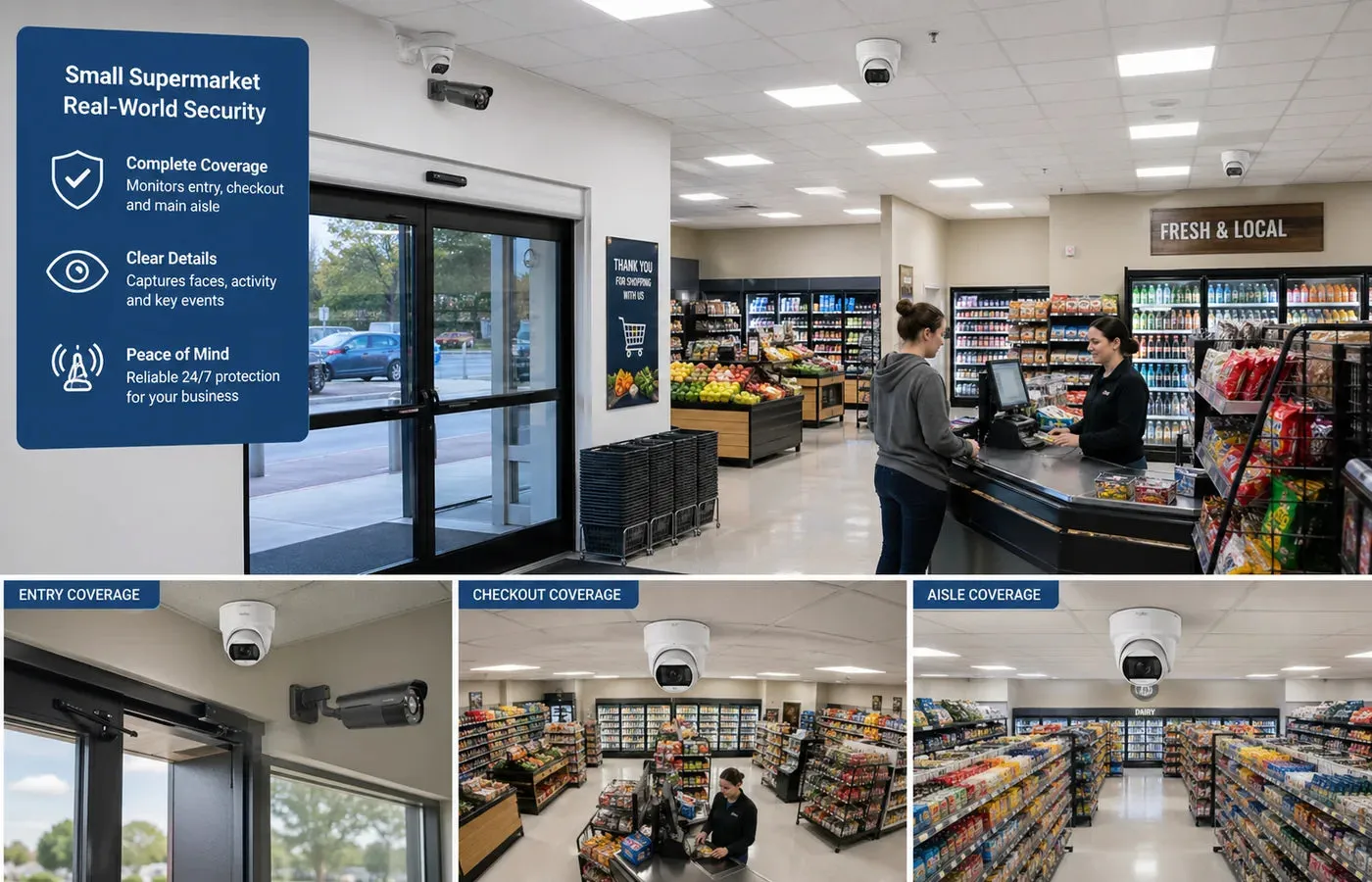
Coverage planning starts with zones. Common small business zones include entrances, exits, reception areas, POS counters, sales floors, aisles, stockrooms, loading doors, office doors, server or equipment rooms, parking spaces, and exterior approaches. Each zone should have a defined purpose: detection, recognition, identification, transaction review, or general context.
Image detail matters more than camera count. A camera that covers too much area may show activity but not useful evidence. For identification, the subject must occupy enough pixels in the image. Camera height, lens angle, distance, lighting, and resolution all matter.
Storage retention should match business needs. Many small businesses choose 15 to 30 days of recording, but higher-risk operations may need more. Storage depends on camera count, resolution, frame rate, bitrate, codec, and recording schedule. H.265 can reduce storage compared with H.264 in many current systems, but compatibility should be checked.
Remote access should be controlled. Owners may want mobile viewing, but shared passwords create risk. A professional system should support individual user accounts, role-based permissions, strong passwords, and account removal when employees leave.
Cybersecurity is part of physical security. IP cameras are network devices. They should be updated, protected by strong credentials, and placed on a secure network. Remote access should avoid unsafe exposure to the internet.
Privacy policies matter. Businesses should avoid cameras in private areas such as restrooms, changing rooms, and break areas where local laws or employee expectations restrict monitoring. Signage and written policies may be required depending on jurisdiction.
Buying Considerations
Before requesting a quote, prepare a site sketch. Mark doors, counters, customer areas, storage areas, outdoor approaches, network room, and available cable paths. This helps the supplier recommend camera types and quantities.
Choose camera resolution based on the task. General indoor coverage may work with 2MP or 4MP cameras. Wider sales floors, outdoor areas, and evidence-critical zones may need 4MP or 8MP. Do not use high resolution as a substitute for proper lens selection.
Select the right camera housing. Turret cameras are popular for indoor and sheltered outdoor use. Dome cameras are discreet and vandal-resistant but may need careful cleaning and installation to avoid infrared reflection. Bullet cameras are visible and easy to aim outdoors. Vandal-resistant models are useful in public or low-mounted areas.
Plan lighting. A night vision camera can record after hours, but infrared range must match the scene. Outdoor security camera positions may need supplemental lighting, especially around entrances, parking, and loading doors. Wide dynamic range is helpful near glass doors and bright windows.
Decide between local, cloud, and hybrid storage. A single-site shop may prefer local NVR storage to avoid monthly fees. A multi-site business may value cloud management. Hybrid storage often balances full local recording with remote alerts.
Ask for evidence export testing. The business should be able to find, play, and export clips easily. Exported footage should include correct time and date. Time synchronization should be configured through NTP or a reliable time source.
Count the whole cost. Include cameras, NVR, hard drives, PoE switches, cable, mounting boxes, UPS, labor, software licenses, cloud subscriptions, and maintenance. The cheapest camera-only quote may not include enough storage or installation material.
Common Applications
Retail shops use surveillance to monitor entrances, checkout counters, aisles, returns desks, stockrooms, and after-hours movement. AI search can help find people events quickly.
Restaurants and cafes use cameras for entrances, cash areas, dining rooms, kitchens, storage, and delivery doors. Placement should respect staff privacy and avoid sensitive areas.
Offices use cameras at entrances, reception, equipment rooms, and parking areas. Many office systems are meant to document access rather than constantly monitor employees.
Clinics, salons, and service businesses use cameras for reception, waiting areas, entrances, and supply rooms. Privacy laws may be stricter in health or personal service environments.
Small warehouses and workshops use cameras for loading doors, inventory areas, tool storage, vehicle access, and safety investigations.
Common Problems
Camera placement that is too high or too wide produces a familiar result: a clear overview with poor identification. Critical points such as entrances and counters need closer views.
Insufficient storage usually appears after the first incident. A business may discover that footage is overwritten after only a few days. Storage should be calculated before purchase.
Poor network design causes dropouts. Too many high-resolution cameras on weak switches or shared Wi-Fi can overload the system. PoE budgets and uplink capacity should be checked.
Remote access can become a security risk. Default passwords, shared admin accounts, and exposed recorder ports create avoidable cybersecurity issues.
Responsibility needs to be assigned. Someone must check camera health, clean lenses, review storage, update firmware, and manage user accounts. A system that is never maintained becomes unreliable.
FAQ
How many cameras does a small business need?
It depends on the layout and risks. Many small shops start with 4 to 8 cameras, while larger restaurants, warehouses, or stores may need 16 or more.
Is a PoE security camera system good for small businesses?
Yes. PoE is stable, scalable, and suitable for permanent installations. It is often better than Wi-Fi for commercial reliability.
Should a small business use cloud storage?
Cloud storage is useful for remote access and off-site backup. Local NVR storage is often more cost-effective for continuous recording. Many businesses use a hybrid approach.
What retention period is recommended?
Many small businesses choose 15 to 30 days. The right retention depends on incident discovery time, risk level, budget, and local rules.
Do small businesses need AI cameras?
AI is not mandatory, but human and vehicle detection can reduce false alerts and speed up footage search. It is especially useful after hours.
Summary
A small business surveillance system should be designed around risks and workflows rather than camera quantity alone. Strong systems combine good placement, suitable image detail, reliable PoE networking, enough storage, secure remote access, and clear maintenance responsibilities. AI surveillance can improve usability, but it works best when the basic camera design is already strong.
For buyers sourcing through Alibaba International Station, a clear site plan and technical requirement list will lead to better supplier recommendations. The useful questions are concrete: what needs to be seen, at what distance, under what lighting, for how many days, and by which authorized users? Those answers create a stronger system than choosing cameras by megapixels alone.
Related QuarkView Planning Resources
For the next planning step, compare retail store surveillance camera placement, motion detection vs. AI detection in security cameras, human detection technology for security cameras, local storage vs. cloud storage for security cameras, and H.264 vs. H.265 planning for CCTV and NVR systems. These related QuarkView guides connect alert quality, placement, storage, and system sizing before you choose hardware.
For product research, start with PoE Camera Systems, AI Camera Systems, NVR Recorders, and Accessories. These QuarkView collections make it easier to match the guide's requirements with cameras, recorders, power equipment, and installation accessories.
How QuarkView Can Help
QuarkView helps buyers turn these planning points into a workable camera system instead of a loose list of specifications. If you are comparing small business surveillance systems, retail cameras, NVR kits, and after-hours alerts, review the camera angle, cable route, storage target, night image quality, and alert requirements before choosing a kit.
For product selection and project planning, visit QuarkView to compare security camera systems and related CCTV solutions for residential, retail, warehouse, parking lot, farm, and small business applications. You can also browse the QuarkView Security Camera Knowledge Base for more planning guides.
Reference Sources
- Axis Communications, public small business and video surveillance planning resources: https://www.axis.com
- Hanwha Vision, public business surveillance and AI analytics application information: https://www.hanwhavision.com
- U.S. Cybersecurity and Infrastructure Security Agency, cybersecurity guidance for connected devices and small organizations: https://www.cisa.gov
- Federal Trade Commission, public business guidance on data security and connected device practices: https://www.ftc.gov
- ONVIF, public information on IP camera interoperability and security product profiles: https://www.onvif.org
- Verkada, public educational materials on cloud-managed and hybrid cloud business video security concepts: https://www.verkada.com