
Remote Viewing Setup for NVR and IP Camera Systems

QuarkView remote viewing setup for NVR and IP security camera surveillance systems

Introduction

A remote viewing security camera setup allows authorized users to view live video, playback recordings, receive alerts, and sometimes control audio or PTZ functions from outside the local site. Remote viewing is now expected in many security camera projects, from residential outdoor security camera systems to commercial NVR security system deployments. A manager may want to check a store after hours, a homeowner may want to see a driveway camera while traveling, and an installer may need to support a PoE security camera system from another location.

Remote viewing is useful, but it can also create an unnecessary opening into the site network. The same path that lets an owner view a CCTV camera from a phone can create cybersecurity and privacy risks if it is configured poorly. Default passwords, exposed ports, outdated firmware, weak routers, and shared accounts can turn a surveillance system into an easy target. A good remote viewing plan balances convenience, reliability, bandwidth, privacy, and security.

NVR and IP camera systems usually use one of five access methods: manufacturer cloud or P2P access, VPN access, DDNS, port forwarding, or direct local network viewing. Each method has different tradeoffs for wired security camera and PoE camera projects.

QuarkView planning note

QuarkView publishes these security camera guides to help buyers, installers, and business operators turn technical choices into workable camera layouts. Use this article to define the requirement, then compare it with Choose a QuarkView NVR for remote viewing or contact QuarkView for project-level guidance.

Related QuarkView planning context

Remote viewing depends on more than app setup; recorder selection, compatibility, alerts, and maintenance all affect whether the system stays reachable. Start with ONVIF compatibility, then compare camera and NVR troubleshooting and smart motion alert setup before finalizing the layout. For a deeper operational layer, keep long-term CCTV maintenance in the planning path.

When the guide turns into a product shortlist, QuarkView buyers can compare PoE camera systems, WiFi and wireless cameras, AI camera systems based on coverage area, cable path, recording needs, and installation environment.

Main Technical Explanation

Most security camera systems are installed on a local network. Cameras connect to an NVR, PoE switch, router, or local recorder. When the user is on the same network, a phone, computer, or monitor can often view the camera by connecting directly to the NVR or camera address. Remote viewing adds a path from outside the local network through the internet.

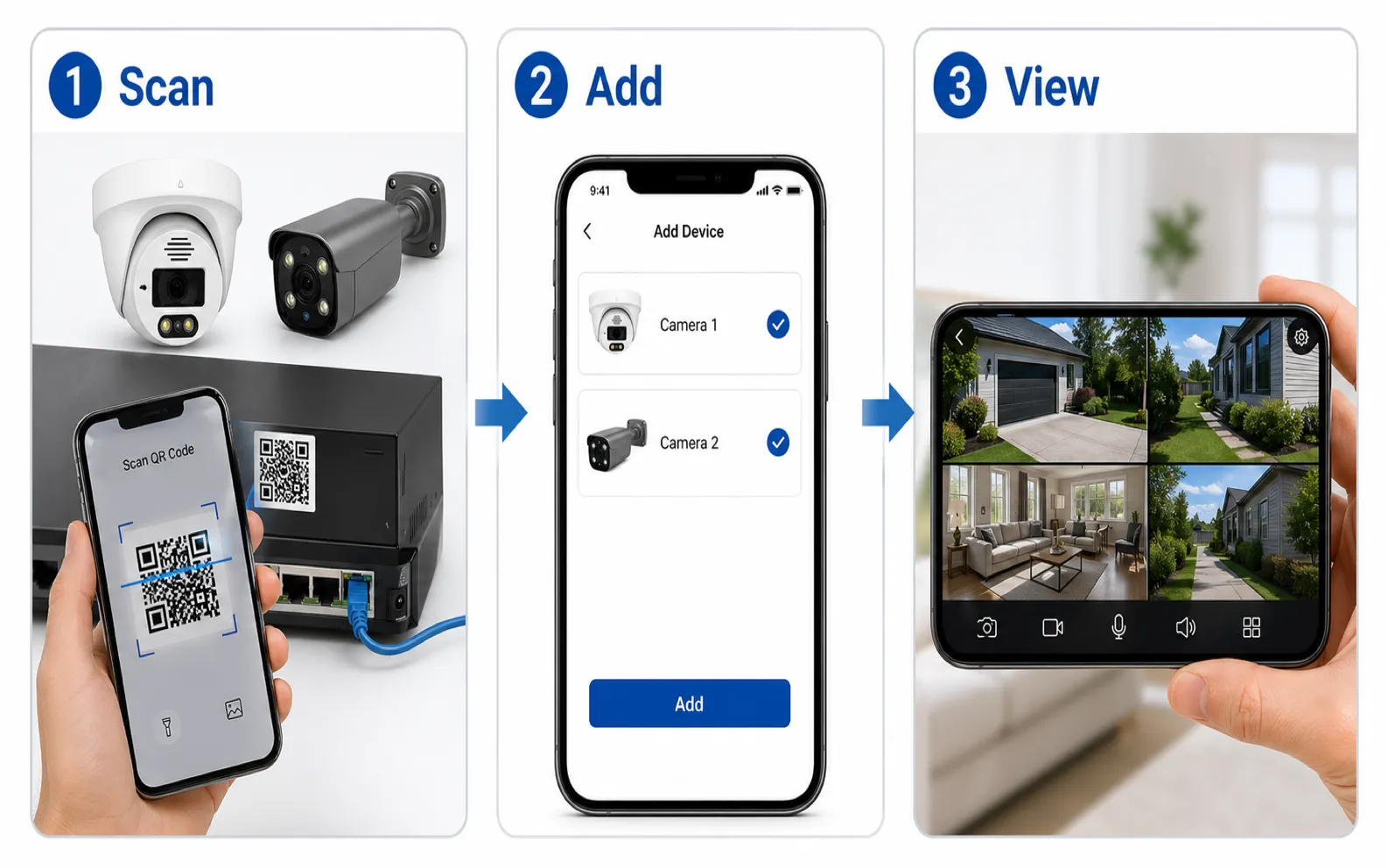
The most common consumer and small business method is manufacturer cloud or P2P access. In this model, the NVR or IP camera connects outward to a service operated by the manufacturer or platform provider. The mobile app logs into the same service and links the user's account to the device. Because the camera initiates the outbound connection, the user usually does not need to configure port forwarding. This is convenient for non-technical users and works well behind many home routers.

The limitation is that the user depends on the manufacturer's service, app, account security, regional server availability, and privacy policy. Some systems use relay servers when direct peer-to-peer connection is not possible, which may increase latency or reduce streaming quality. If the service is unavailable, remote viewing may fail even though the local NVR is working.

VPN access is often preferred for business and higher-security environments. A VPN creates an encrypted connection from the remote user's device into the local network. After connecting to the VPN, the user accesses the NVR security system as if they were on-site. This avoids exposing camera or recorder ports directly to the internet. It can also support multiple cameras, VMS servers, and network devices through one controlled access method.

VPN setup requires more network knowledge. The router, firewall, or VPN gateway must be configured. User accounts and multi-factor authentication should be used where possible. Access should be limited so remote users can reach only the necessary surveillance resources. VPN performance also depends on internet upload speed at the camera site and download speed at the remote location.

Port forwarding is an older and still common method. A router rule forwards traffic from a public internet port to the local NVR or camera. For example, a remote user connects to a public IP address and port, and the router sends the request to the recorder. Port forwarding can work, but it increases exposure because the service becomes reachable from the internet. If the device has weak credentials, outdated firmware, or vulnerable services, attackers may find it through scanning. If port forwarding is used, it should be minimized, protected with strong passwords, updated firmware, and preferably restricted by source IP or combined with other controls. Many organizations avoid direct port forwarding for cameras and use VPN instead.

DDNS, or dynamic DNS, helps when the internet service provider changes the site's public IP address. Instead of remembering a numeric IP address, the user connects to a hostname that updates automatically. DDNS is often used with port forwarding or VPN. It does not secure the connection by itself; it only solves the changing-address problem.

Direct camera remote viewing without an NVR is also possible for some IP camera models. The camera may connect to a mobile app, cloud service, VPN, or forwarded port. This can be suitable for small installations, but an NVR offers centralized recording, user management, storage, and playback. In a multi-camera wired security camera system, remote viewing through the NVR is usually easier to manage than exposing each camera individually.

Bandwidth is a major technical factor. Live viewing from outside the site uses the site's upload speed. A 4 MP or 8 MP IP camera stream at high frame rate can consume significant bandwidth. Mobile apps often use a lower-resolution substream for remote live view and reserve the main stream for recording. If several users view multiple cameras at once, the internet connection may become a bottleneck.

Security settings belong in the setup checklist. Remote viewing should use unique strong passwords, firmware updates, disabled default accounts, account lockout where available, encrypted connections where supported, limited user permissions, and review of access logs. If two-way audio is enabled, account security matters even more because a compromised account may allow someone to speak through the camera.

Key Features or Concepts

Local viewing means accessing cameras or the NVR on the same network. It is usually faster and simpler than remote viewing.

Cloud or P2P viewing is convenient because it usually avoids router configuration. It depends on the manufacturer's platform and account security.

VPN viewing creates an encrypted private path into the site network. It is often better for business security than direct port exposure.

Port forwarding exposes a local device service to the internet. It can work, but it should be treated as a higher-risk method and secured carefully.

DDNS provides a stable hostname when the public IP address changes. It does not replace authentication or encryption.

Substreams reduce bandwidth for mobile viewing. The main stream can remain high quality for recording while remote viewing uses a lighter stream.

Upload speed at the camera site determines remote live-view capacity. Many internet plans have much lower upload speed than download speed.

User permissions control what remote users can do. Some users may need live view only, while others need playback, export, PTZ, audio, or configuration access.

Buying Considerations

Before buying, decide how remote viewing should work. A home user may prefer a simple app-based setup. A business may require VPN, centralized user accounts, logs, and limited permissions. A multi-site operator may need a VMS or cloud platform that can manage many NVRs.

Check whether the NVR and cameras support secure remote access options. Look for HTTPS support, app account protection, firmware update process, user roles, audit logs, and the ability to disable unused services.

Confirm mobile app availability and long-term support. Remote viewing depends heavily on app quality. Check whether the app supports live view, playback, event search, push alerts, two-way audio, multi-user access, and multiple sites.

Review internet service. If the site has slow upload speed, remote viewing may require lower resolution, fewer simultaneous streams, or event-based playback. For high-value sites, a reliable internet connection and backup connection may be worth considering.

Ask whether the system uses direct P2P, relay service, regional cloud storage, or local-only access. This affects privacy, speed, and service dependency.

For PoE security camera system projects, decide whether remote users will access the NVR only or also individual cameras. Exposing individual cameras increases management work and risk.

Plan account management. Avoid shared admin accounts. Create named users with appropriate permissions. Remove former employees or contractors promptly.

Common Applications

Residential users use remote viewing to monitor front doors, driveways, garages, yards, and deliveries while away from home.

Retail managers use remote viewing to check opening, closing, cash register activity, customer flow, and after-hours alerts.

Warehouses and logistics sites use remote viewing to verify loading dock activity, gate events, and vehicle movement.

Installers use remote access for support, but access should be controlled and removed or reviewed after the service period.

Property managers use multi-site remote viewing to monitor apartment entrances, parking areas, and shared facilities.

Small offices use remote viewing to check alarms, visitor activity, and weekend events without sending staff to the site.

Common Problems

Remote viewing fails after changing the router. The new router may not have the old port forwarding, UPnP, DDNS, firewall, or VPN configuration.

Live video works on Wi-Fi but not on mobile data. The app may be connecting locally only, or remote access may not be configured correctly.

Remote video is slow or blurry. The app may be using a substream, the upload speed may be limited, or the platform may be relaying traffic through a distant server.

The public IP address changes. DDNS or cloud/P2P service can solve this, depending on the chosen remote viewing method.

Port forwarding works for a while and then fails. The NVR local IP address may have changed. Use DHCP reservation or a properly managed static address.

Multiple users cannot view at the same time. The site internet upload speed, NVR processing capacity, or cloud relay limit may be insufficient.

Security alerts appear after remote access is enabled. Review exposed services, passwords, firmware, logs, and router settings. Disable unused access methods.

FAQ

What is the easiest way to set up remote viewing for a security camera?

For many home and small business users, the easiest method is the manufacturer's mobile app with cloud or P2P device linking. It usually avoids router configuration.

What is the most secure common method?

For many business systems, VPN-based access is preferred because it avoids exposing camera or NVR services directly to the internet.

Do I need port forwarding for remote viewing?

Not always. Cloud/P2P and VPN methods may not require direct port forwarding to the camera or NVR.

Why is remote viewing slower than local viewing?

Remote viewing depends on internet upload speed, mobile network quality, routing, server relay, stream bitrate, and device processing.

Can I view a PoE camera remotely without an NVR?

Yes, if the camera supports remote access through an app, VPN, or other method. For multiple cameras, an NVR is usually easier to manage.

Should I enable UPnP on my router for cameras?

UPnP can automatically create port mappings, but it can also expose services unintentionally. Many security-conscious installations disable UPnP and configure access deliberately.

Summary

Remote viewing is useful only when it is reliable and controlled. Cloud or P2P access is convenient, VPN access is often better for business environments, DDNS helps with changing public addresses, and port forwarding should be used cautiously. A reliable remote viewing security camera setup needs adequate upload bandwidth, correct stream settings, strong account security, updated firmware, and clear user permissions.

How QuarkView Can Help

QuarkView helps buyers translate these planning points into practical camera layouts, recorder choices, storage targets, and installation accessories for homes, retail stores, offices, warehouses, parking areas, farms, and supplier projects.

Explore related QuarkView products or contact QuarkView for project support, volume inquiries, and system planning help.

Reference Sources

Related QuarkView resources

Next steps

Keep comparing before you choose equipment.

Use the links below to move from this guide into adjacent planning topics, product families, or a short quote request.

Related guides

Open Knowledge Base hub

Shop related systems

Need help choosing?

Share the site type, camera count, and recording target.

QuarkView can narrow PoE, NVR, PTZ, AI, WiFi, or solar options from a short project note.