
QuarkView Security Learning Center. This guide is part of QuarkView's practical security camera knowledge base for home, retail, office, warehouse, installer, and small business projects.
Use it to clarify requirements before comparing PoE camera systems, NVR recorders, outdoor cameras, wireless cameras, and accessories.
Buying a security camera system is easier when the basic vocabulary is clear. Many home and business buyers start with simple questions: How many cameras do I need? Is a CCTV camera different from an IP camera? What is an NVR security system? Do I need a wired security camera, a wireless model, or a PoE security camera system? The answers depend on the site, the risk level, the lighting, the recording period, and the way people will review video after an incident.
This security camera FAQ is for first-time buyers, facility managers, retail operators, installers, and purchasing teams who need practical guidance before comparing products. It does not assume that the reader already understands camera lenses, network video, motion recording, storage, night vision camera performance, or AI surveillance analytics. The explanations stay close to the buying decisions people actually face.
A surveillance system should be planned around outcomes. Some buyers want general awareness at a front door. Others need clear face capture at a reception desk, license plate context at a gate, employee safety coverage at a warehouse, or after-hours monitoring for a small business. These are different requirements. A wide angle camera that covers a lobby may not provide enough detail at a distant loading dock, while a zoom or PTZ camera may be powerful but unsuitable as the only camera for continuous area coverage.
Use this QuarkView Knowledge Base FAQ as a pre-purchase checklist. It can help reduce familiar mistakes: buying only by resolution, underestimating storage, placing an outdoor security camera in poor lighting, ignoring privacy responsibilities, or choosing devices that cannot work together.
How it works
A modern security camera system is usually built from cameras, power, network connection, storage, viewing software, and user permissions. Traditional analog CCTV systems send video over coaxial cable to a DVR. Modern IP camera systems send digital video over an Ethernet network to an NVR, VMS server, cloud platform, or edge storage card. Both may be called CCTV in everyday language, but the technical design is different.
An IP camera contains its own image sensor, processor, compression engine, network interface, and often analytics. A PoE camera can receive power and data through one Ethernet cable when connected to a compatible PoE switch or NVR PoE port. This makes installation cleaner than running separate power and data lines. A PoE security camera system is common in homes, retail shops, offices, warehouses, and restaurants because it is stable, scalable, and easier to maintain than many battery or Wi-Fi options.
An NVR security system records digital video from network cameras. The NVR stores video on hard drives, provides playback search, manages users, and often supports mobile or browser viewing. Some NVRs include built-in PoE ports. Others connect to cameras through an external network switch. The correct design depends on camera count, cable routes, distance, bandwidth, storage needs, and whether the site needs network segmentation.
Resolution is only one part of image quality. A 4MP or 8MP security camera can produce more pixels than a 1080p camera, but lens choice, field of view, sensor size, compression, shutter speed, lighting, mounting height, and WDR performance determine whether the footage is useful. For example, a camera mounted too high may show a person clearly from above but fail to capture a recognizable face. A camera pointed toward a glass door may need wide dynamic range to manage bright outdoor light and darker indoor space in the same scene.
Recording can be continuous, motion-based, schedule-based, or event-based. Continuous recording gives the most complete timeline but uses more storage. Motion recording saves capacity but may miss important context if detection areas or sensitivity settings are poorly configured. Event recording uses inputs such as line crossing, human detection, vehicle detection, alarm inputs, access control events, or other AI surveillance rules. A buyer should decide whether the system is for live monitoring, post-incident evidence, operations review, or all three.
Features to compare
Field of view and detail should be considered together. A wide angle camera covers more area, but each person or vehicle receives fewer pixels. A narrow angle or zoom camera sees less of the scene and more detail at distance. Many useful systems mix both types.
PoE is usually preferred where stable recording matters. A wired security camera using PoE receives power and data through one Ethernet cable. Wi-Fi cameras can work in small spaces, temporary locations, or places where cable is impossible, but they depend on wireless signal quality and power availability.
Night vision needs a reality check. A night vision camera may use infrared LEDs, low-light color imaging, visible white light, or a mix. IR range on a specification sheet does not guarantee identification detail. It mainly tells you how far the camera can illuminate under test conditions.
Outdoor protection is more than the camera rating. An outdoor security camera should have a suitable weather rating, but the cable connection, junction box, mounting angle, and wall penetration also need protection.
Interoperability helps, but it is not automatic. ONVIF profiles can make cameras, recorders, and software easier to combine. Still, compatibility should be checked by product model, firmware version, profile support, and required feature.
Storage retention depends on bitrate, camera count, recording hours, frame rate, codec, scene motion, and retention days. A 16-channel NVR with too little hard drive capacity may overwrite video earlier than the buyer expects.
User access matters in any business surveillance system. Use individual accounts, strong passwords, firmware maintenance, role-based permissions, and controlled remote access. Shared admin passwords create avoidable risk.
Match equipment to the site requirements
Start by listing the areas that must be monitored: entrances, driveways, reception, checkout counters, storage rooms, loading docks, parking spaces, corridors, perimeter gates, and restricted zones. Then define the purpose for each view. Is the camera expected to detect activity, recognize a person, identify details, verify transactions, or support safety reviews? The same security camera cannot always do all of these from one location.
For a home security camera system, buyers often prioritize front door coverage, side access, driveway, backyard, and package delivery zones. A small business may need a wider mix: doors, cash handling areas, shelves with high-value products, staff-only spaces, exterior approach paths, and after-hours entry points. A warehouse may need elevated overviews plus targeted views at dock doors and forklift traffic areas.
Choose camera form factors based on environment. Dome cameras are discreet and protected under a cover, but reflections and IR glare may occur if the dome is dirty or incorrectly mounted. Bullet cameras are easier to aim and visible as a deterrent. Turret cameras are common for outdoor and indoor use because they combine flexible aiming with fewer dome reflection issues. PTZ cameras can follow activity or zoom into a scene, but they should not replace fixed cameras where continuous coverage is required.
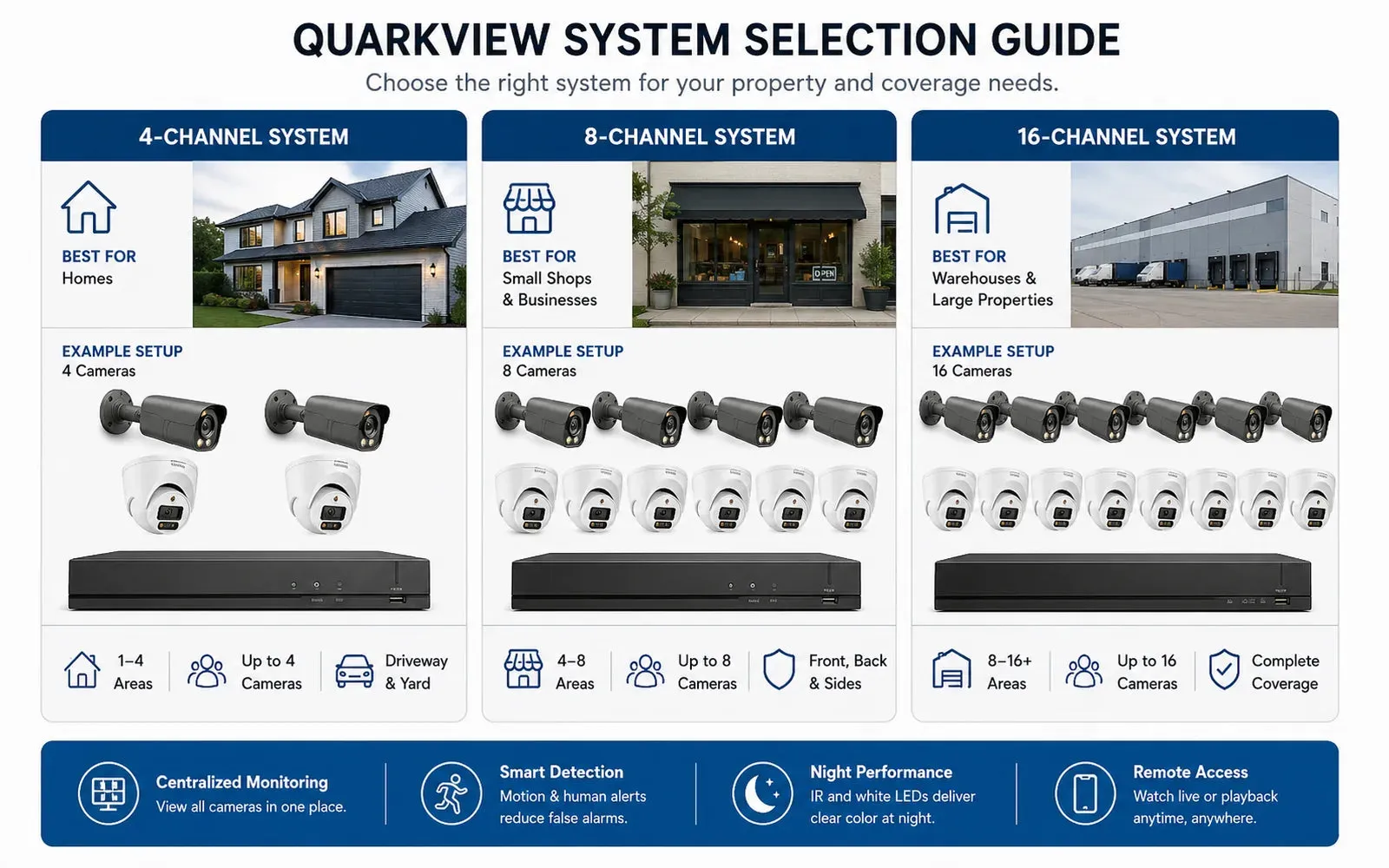
Check NVR capacity before purchasing. Confirm the number of channels, incoming bandwidth, recording bandwidth, hard drive bays, maximum supported drive size, PoE budget, supported codec, remote viewing method, and whether the system can handle future expansion. For example, an 8-camera system may be enough today, but a 16-channel NVR may make sense if a business expects to add cameras later.
Do not ignore cybersecurity. Change default passwords, update firmware, use unique accounts, disable unused services, and avoid exposing cameras directly to the internet. Remote access should be configured carefully, preferably through secure vendor methods, VPN, or controlled network policies.
Common Applications
Home security applications include front door monitoring, driveway recording, backyard visibility, garage coverage, package delivery review, and checking activity while away. A home buyer may choose a PoE camera system when remodeling or building because Ethernet cables can be hidden before walls are closed.
Retail applications include entrance monitoring, checkout dispute review, shelf loss investigation, queue awareness, employee safety, and after-hours alarm verification. A retail business surveillance system often benefits from continuous recording during opening hours and event alerts after closing.
Office applications include reception coverage, server room monitoring, visitor area recording, and parking lot context. Privacy is especially important in offices because cameras should not be placed where employees reasonably expect privacy.
Warehouse and logistics applications include dock doors, receiving areas, inventory aisles, perimeter fences, yard gates, and vehicle movement zones. These sites often require outdoor security camera models with strong weather ratings, night performance, and careful storage planning.
Restaurants and cafes may use cameras for entrances, point-of-sale areas, stock rooms, dining area context, and exterior approaches. Camera placement should avoid intrusive views while still supporting safety and incident review.
Common Problems
One common problem is buying a camera with high resolution but too wide a lens for the target. The image looks sharp when viewed as a full scene, but a face or license plate is too small when zoomed in. Another problem is placing a camera too high. High mounting can reduce tampering, but it may produce poor identification angles.
Night footage often disappoints buyers because low light introduces noise, motion blur, overexposed faces near IR LEDs, or dark backgrounds beyond the IR range. Better lighting, proper camera placement, WDR, and lens selection often solve more than resolution alone.
Motion recording can fail if sensitivity is too low, zones are poorly configured, or the camera is facing trees, rain, traffic headlights, or reflective surfaces. AI surveillance can reduce false events by distinguishing people and vehicles, but it must still be tested at the actual site.
Storage shortage is another frequent issue. Buyers may expect 30 days of recording but receive only 7 to 14 days because bitrate, camera count, or recording mode was underestimated. Always calculate storage with realistic settings and confirm retention after installation.
Compatibility can also cause frustration. A third-party IP camera may connect to an NVR for basic video but not support advanced motion events, audio, smart search, or AI metadata. ONVIF support helps, but it is not a substitute for verifying required features.
FAQ
What is the difference between a CCTV camera and an IP camera?
A CCTV camera is a general term for a closed-circuit video camera. In many markets it refers to analog cameras, but buyers also use CCTV to describe modern IP video systems. An IP camera is a digital network camera that sends video over an Ethernet or Wi-Fi network.
Is a PoE camera better than Wi-Fi?
For permanent security recording, a PoE camera is often more stable because one cable provides power and network connection. Wi-Fi is useful where cabling is difficult, but signal interference and power management must be considered.
How many cameras do I need?
Count the areas that require coverage, then decide whether each needs overview, recognition, or identification detail. Many small homes use 4 to 8 cameras. Many small businesses use 8 to 16 cameras, but the correct number depends on layout.
Do I need an NVR?
An NVR is useful when you want local recording, centralized playback, multi-camera management, and longer retention. Some cameras can record to SD cards or cloud storage, but an NVR security system is usually more practical for multi-camera deployments.
What resolution should I choose?
1080p may be enough for small rooms and short distances. 4MP, 5MP, or 8MP can help when you need more detail, but lens, lighting, and bitrate matter. Resolution should match the required scene detail.
What does night vision mean?
Night vision usually means the camera can record in low light or darkness using infrared, low-light sensors, or visible illumination. Buyers should test real nighttime performance rather than relying only on an advertised IR distance.
Can one PTZ camera replace several fixed cameras?
Usually no. A PTZ camera can zoom and move, but it records only where it is pointed at that moment. Fixed cameras provide continuous coverage of important areas.
How long can a system record?
Retention depends on storage capacity, number of cameras, bitrate, resolution, frame rate, codec, and recording mode. Use a storage calculator, then add a margin for real-world motion and lighting.
Are security cameras legal?
Rules vary by country, state, and business type. In general, cameras should have a legitimate purpose, avoid private areas, use clear signage where required, limit access, and retain footage only as long as needed.
What should I ask before buying?
Ask what each camera must see, how long footage must be stored, who can access video, whether remote viewing is needed, what weather rating is required, whether AI events are needed, and how the system will be maintained.
Related QuarkView Planning
If this FAQ is your starting point, continue with the Beginner Guide to CCTV Systems for basic system structure, then compare the broader buying process in the Complete Buyer Guide for Security Cameras. Buyers choosing between recorder types should also review the NVR vs DVR guide and the practical notes on security camera recording basics.
When you are ready to compare hardware, QuarkView's NVR recorders, single PoE cameras, and WiFi wireless cameras give buyers a useful way to turn these FAQ answers into a short product list.
Summary
A camera kit is only the hardware. Useful footage comes from the whole plan: lenses, mounting positions, power, network design, recording method, storage, privacy controls, and maintenance. A home security camera buyer may need simple entrance and driveway coverage. A business surveillance system may require PoE cameras, an NVR, user permissions, signage, and retention policies. Define the surveillance goal before comparing hardware. Then use a site plan, mark camera purposes, estimate storage, and verify that all components work together.
Plan Your Security Camera System With QuarkView
Explore related QuarkView products or contact QuarkView for project and volume inquiry support.