
QuarkView Security Learning Center. This guide is part of QuarkView's practical security camera knowledge base for home, retail, office, warehouse, installer, and small business projects.
Use it to clarify requirements before comparing PoE camera systems, NVR recorders, outdoor cameras, wireless cameras, and accessories.
A beginner guide to CCTV should start with one important point: CCTV is not a single product. It is a system. A working CCTV system includes cameras, cable or wireless links, power, recording equipment, storage, viewing software, installation settings, and maintenance practices. If one part is poorly chosen, the entire surveillance system may fail to provide useful evidence when it is needed.
The term CCTV originally meant closed-circuit television, where video was transmitted to a limited set of monitors instead of being broadcast publicly. In modern buyer language, CCTV camera often means any security camera used for property protection, business monitoring, safety review, or incident investigation. Many current systems are digital IP camera systems, where each camera connects to a network and records to an NVR security system, cloud platform, VMS server, or local memory card.
Beginners usually need the same things first: the parts of the system, the common camera types, the recording choices, the installation limits, and the mistakes that cause poor footage. This guide covers those points before a buyer compares a home security camera, a small business surveillance system, or a larger wired security camera deployment.
How it works
A CCTV system starts with the camera. The camera captures light through a lens, converts it into an electrical signal through an image sensor, processes that signal, compresses it, and sends video to a recorder or viewing platform. Analog cameras send video over coaxial cable, while IP cameras send data packets over a network. A PoE camera can receive both power and data through one Ethernet cable, which simplifies many installations.
In an analog system, cameras usually connect to a DVR. The DVR digitizes and records the video. Analog HD systems can still be useful in sites with existing coaxial cable, but they offer less network flexibility than IP systems. In an IP system, cameras connect to an NVR, PoE switch, router, or managed network. The NVR records the digital video stream, indexes events, and provides playback.
A beginner should understand the difference between a camera channel and a camera view. A channel is the recorder input capacity, such as 4-channel, 8-channel, 16-channel, or 32-channel. A view is the actual area seen by a camera. A 16-channel NVR can support up to 16 cameras, but useful coverage depends on how those cameras are placed and what each camera is expected to capture.
Power is another core topic. Some cameras use plug-in power supplies. Many professional IP cameras use PoE, which stands for Power over Ethernet. PoE allows a single Ethernet cable to carry power and network data. A PoE security camera system may use an NVR with built-in PoE ports or a separate PoE switch. The total PoE power budget must be enough for all connected cameras, especially outdoor security camera models with heaters, IR LEDs, motorized lenses, or PTZ motors.
Storage is where video is kept. A recorder hard drive is not the same as a normal office computer drive. Surveillance hard drives are designed for continuous writing, multiple video streams, and longer duty cycles. Storage planning should consider camera count, resolution, frame rate, compression, bitrate, recording mode, and desired retention days. Beginners often underestimate storage because they focus only on camera quantity.
Viewing and management software complete the system. A local monitor connected to the NVR can show live and recorded video. Mobile apps and browser access may allow remote viewing. Business systems may require multi-user access, audit logs, role-based permissions, or integration with alarms and access control. Good software matters because most users interact with the system through search, playback, export, and alerts.
Features to compare
Camera type affects both the view and the installation. Bullet cameras are visible and easy to aim. Dome cameras are compact and more protected from casual tampering. Turret cameras are easy to adjust and avoid some IR reflection problems seen in dirty domes. PTZ cameras can pan, tilt, and zoom, but they need control rules and should not be the only source of coverage for critical areas.
Resolution is useful only when the rest of the image chain works. Common choices include 1080p, 4MP, 5MP, and 8MP. More pixels can help, but they also increase storage and bandwidth. A higher-resolution security camera will still disappoint if the lens is too wide, the lighting is poor, or compression is too aggressive.
Lens and field of view decide how much detail reaches the sensor. A wide angle lens covers a broad scene but spreads pixels across a larger area. A narrower lens captures more detail in a smaller area. Fixed lenses are simple; varifocal models let the installer adjust the view after mounting.
Night performance depends on the scene. A night vision camera may use infrared illumination, low-light color imaging, or built-in white light. The right choice depends on whether the buyer needs discreet nighttime recording, color detail, or clear activity detection in total darkness.
WDR, or wide dynamic range, helps when bright and dark areas appear in the same scene. Entrances with sunlight behind a visitor are a common example. Without WDR, faces may appear too dark or backgrounds may be washed out.
Compression reduces video size. H.264 and H.265 are common codecs. H.265 can lower bandwidth and storage for many scenes, but compatibility with older recorders and browsers should be checked.
AI surveillance can include human detection, vehicle detection, line crossing, intrusion zones, face capture, people counting, or search filters. It can reduce false alarms. It still depends on camera angle, distance, lighting, and configuration.
Match equipment to the site requirements
Begin with a simple site plan. Draw or print the floor plan and mark entrances, exits, driveways, gates, hallways, cash handling areas, storage areas, and high-value zones. For each location, write the purpose of the camera: overview, detection, recognition, identification, operations review, or evidence. This prevents buying a package that has the right number of cameras but the wrong types of views.
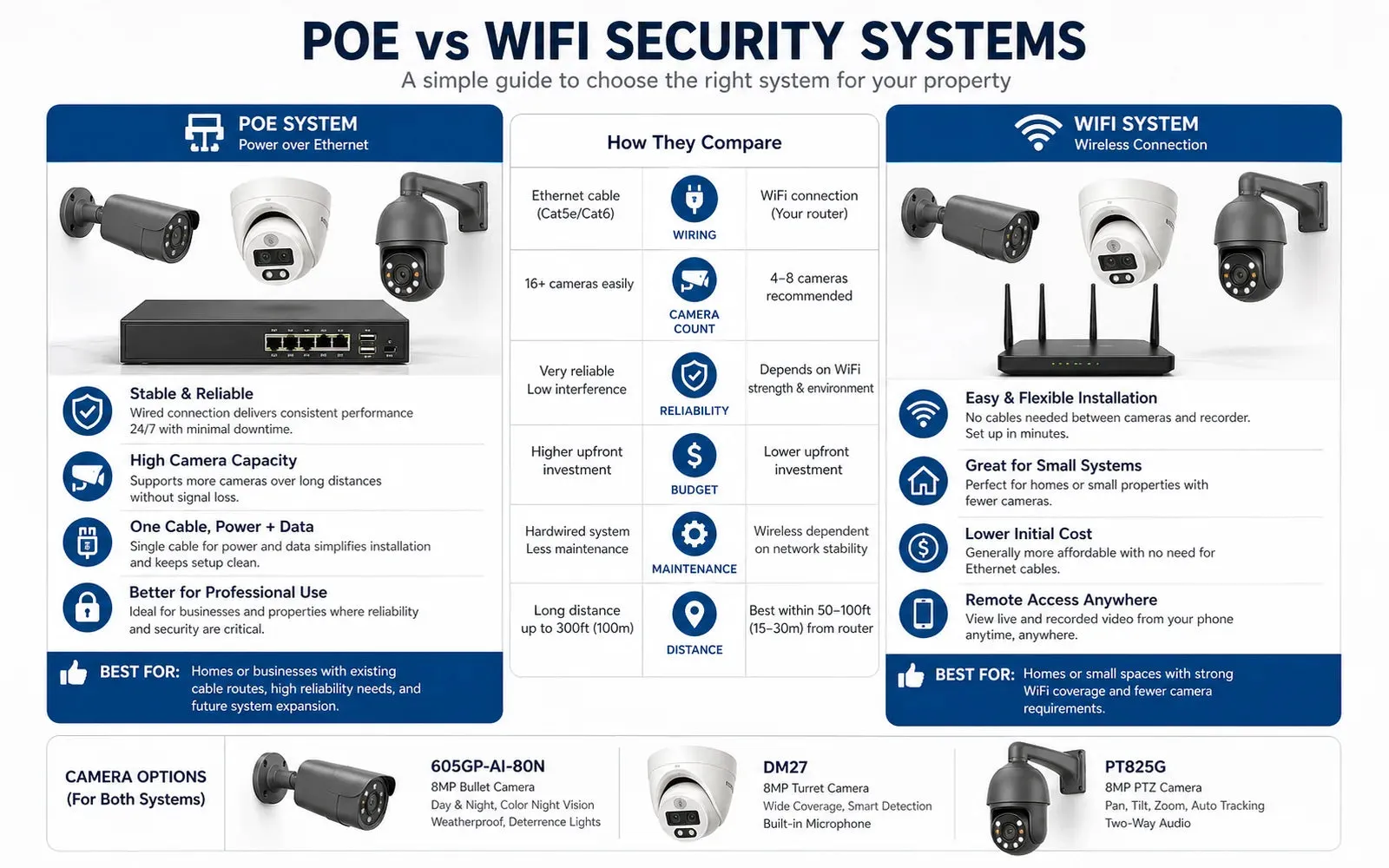
Decide whether the system should be wired, wireless, or mixed. A wired security camera system is generally preferred for permanent installations because it provides stable power and video transmission. Wireless cameras can work in small homes or temporary spaces, but Wi-Fi interference, walls, distance, and router load can affect reliability. Battery cameras may be convenient but usually have more limited recording behavior than wired systems.
Check cable distances. Ethernet cable has practical length limits, commonly around 100 meters for standard copper Ethernet links without extension equipment. Longer runs may need fiber, network extenders, additional switches, or a different layout. Outdoor cable should be rated for its environment, and cable entries should be sealed against moisture.
Consider lighting before camera selection. Many buyers install cameras only to discover that night scenes are too dark, headlights wash out vehicles, or sunlight creates strong backlight. A small amount of planned lighting can dramatically improve image quality. For entrances, choose cameras with suitable WDR. For perimeter zones, evaluate IR range, mounting angle, and reflective surfaces.
Plan storage based on retention requirements. Homes may be comfortable with 7 to 14 days. Retail shops, warehouses, or regulated sites may need 30, 60, or 90 days, depending on policy and local rules. Retention is both a technical decision and a privacy decision.
Verify compatibility. If all equipment is from one ecosystem, features may be easier to configure. If cameras and recorders are mixed, check ONVIF profile support and confirm that motion events, audio, smart search, PTZ control, and analytics work as required. ONVIF can help with interoperability, but exact feature behavior varies.
Common Applications
For homes, beginner CCTV systems often cover the front door, driveway, garage, side gate, backyard, and common exterior approach paths. A home security camera should be placed low enough for useful face detail but high enough to reduce easy tampering.
For retail stores, CCTV systems support entrance review, transaction dispute resolution, loss investigation, staff safety, and after-hours monitoring. Cameras should cover public customer areas and business-critical points without invading private spaces.
For offices, common views include reception, main entrance, meeting room corridors, server rooms, stock rooms, and parking areas. Office systems should have clear privacy rules and limited access to recorded video.
For warehouses, cameras often cover loading docks, receiving doors, aisles, inventory cages, forklift routes, parking yards, and perimeter gates. Outdoor cameras should be chosen for weather rating, low-light ability, and mounting stability.
For schools, clinics, and community facilities, CCTV design should be handled carefully with privacy, signage, access control, and retention policies. Cameras may support safety and incident review, but they should not replace human supervision or policy.
Common Problems
Many beginners buy by camera count instead of coverage need. An 8-camera kit may be too much for a small apartment and too little for a business with multiple entrances. Another common mistake is expecting a wide angle camera to capture everything. It may show movement but not enough detail for identification.
Another problem is poor cable planning. Exposed outdoor cable, unsealed junction boxes, and sharp bends can create failures months after installation. Water entering a cable connection can damage a PoE camera or cause intermittent network dropouts.
Incorrect recorder sizing is also common. Some buyers purchase a low-cost NVR without enough incoming bandwidth, hard drive bays, or PoE power budget. The system works during setup with a few cameras but struggles after expansion.
Privacy mistakes can create legal and trust issues. Avoid placing cameras in bathrooms, changing rooms, private offices without legitimate need, or neighboring property views. Use signage where appropriate, document the reason for recording, and limit access to footage.
Maintenance is easy to forget. Lenses get dirty, spider webs block IR, firmware ages, passwords are shared, hard drives fail, and time settings drift. Inspect the CCTV system on a schedule instead of waiting until an incident exposes a problem.
FAQ
What is the simplest CCTV system for a beginner?
A basic PoE security camera system with 4 to 8 cameras, an NVR, pre-planned cable routes, and a monitor or mobile app is often simple for homes and small businesses. The exact choice depends on layout.
Should I choose analog CCTV or IP cameras?
IP cameras are generally more flexible for new installations because they support network management, higher resolutions, analytics, and PoE. Analog systems may make sense where good coaxial cable is already installed.
Is 4K always better?
Not always. 4K provides more pixels, but it requires more storage and bandwidth. A well-placed 4MP camera with the correct lens can outperform a poorly placed 4K camera.
Do cameras record without internet?
Yes, many NVR security systems record locally without internet. Internet is typically needed for remote viewing, updates, time synchronization, or cloud features.
What is ONVIF?
ONVIF is an industry forum that defines profiles for interoperability among IP-based physical security products. It helps cameras, recorders, and software communicate, but buyers still need to confirm exact model compatibility.
How high should cameras be mounted?
Many cameras are mounted roughly 2.5 to 4 meters high, depending on the site. Higher placement reduces tampering but may reduce face detail. Critical identification views often need careful angle planning.
Can I install CCTV myself?
Some homes and small shops can install basic systems themselves. Larger sites, long cable runs, outdoor work, ladder use, electrical constraints, or compliance needs may justify a professional installer.
How often should I check the system?
Check camera views, recording, playback, time settings, storage health, remote access, and firmware on a regular schedule. Monthly checks are a practical starting point for many small systems.
Related QuarkView Planning
New buyers can build on this overview by reading what what a PoE security camera system is, how an NVR vs DVR comparison affects recording, and when wired vs wireless security cameras make sense. If the first cameras will be mounted outside, the outdoor security camera installation guide is the next practical step.
For entry-level system planning, compare QuarkView NVR recorders, WiFi wireless cameras, and security camera accessories against your camera count, mounting locations, and recording needs.
Summary
A beginner guide to CCTV is really a guide to planning. The camera is only one part of the system. Good results depend on matching camera type, lens, lighting, power, network, recorder, storage, and privacy practice to the real location. A PoE camera and NVR security system can be a reliable foundation for many homes and small businesses, but the design should answer specific surveillance goals. Before buying, identify what must be seen, where cameras can be mounted, how long footage must be kept, and who will manage the system.
Plan Your Security Camera System With QuarkView
Explore related QuarkView products or contact QuarkView for project and volume inquiry support.