
QuarkView Security Learning Center. This guide is part of QuarkView's practical security camera knowledge base for home, retail, office, warehouse, installer, and small business projects.
Use it to clarify requirements before comparing PoE camera systems, NVR recorders, outdoor cameras, wireless cameras, and accessories.
Many projects start with a vague request: "we need cameras." That is not enough to design a useful surveillance system. Homes, retail stores, offices, warehouses, restaurants, schools, and small factories all use security cameras, but they do not need the same configuration. The system should match the site layout, lighting, risk level, operating hours, privacy expectations, and retention policy.
Many buyers begin by comparing camera resolution or package price. Those details matter, but they are not enough. A surveillance system includes camera selection, lens planning, power, network design, recording, storage, viewing access, cybersecurity, signage, maintenance, and user training. If these parts are not planned together, the result may be video that is technically recorded but not useful.
For buyers comparing a home security camera system or a business surveillance system, the main questions are practical: where should cameras go, what must each view capture, how will the video be recorded, and who will manage it? The same questions apply to indoor and outdoor security camera coverage, PoE camera infrastructure, NVR security system sizing, night vision camera requirements, AI surveillance features, and responsible video management.
How it works
Start with the site objective. Surveillance can support deterrence, live awareness, safety review, loss investigation, access verification, parking lot context, perimeter monitoring, and operational analysis. Each objective needs a different type of video. A wide overview camera may show that an event happened. A narrower camera may provide the face or object detail needed to understand who or what was involved.
The next layer is camera placement. Entrances and exits are usually priority locations because they create a record of who enters and leaves. Driveways, gates, reception areas, checkout counters, loading docks, storage rooms, and perimeter zones may also require coverage. Indoors, the designer must avoid private spaces and consider backlight from windows. Outdoors, the designer must consider rain, dust, sunlight, shadows, insects, vandalism, cable exposure, and nighttime lighting.
Camera technology comes next. A modern IP camera converts video into a digital stream. It may include compression, WDR, IR night vision, audio, analytics, edge storage, and network security settings. A PoE camera receives power and data over Ethernet. A PoE security camera system can simplify deployment because each camera needs only one network cable to a PoE switch or PoE NVR port. For a stable wired security camera system, cable routing and switch capacity are as important as camera specifications.
Recording is usually handled by an NVR, VMS server, or cloud-connected platform. An NVR security system is common for homes and small businesses because it centralizes recording and playback. It may support local HDMI output, mobile app access, browser access, smart search, motion events, hard drive health checks, and user permissions. Larger commercial sites may use a video management system to manage many cameras, multiple recorders, and role-based access across locations.
Storage planning is a technical and operational decision. The buyer must decide how many days of video are needed and which recording method will be used. Continuous recording offers the most complete timeline. Motion and event recording reduce storage but rely on detection settings. A system with eight 4MP cameras recording continuously at a moderate bitrate may require significantly more storage than a system with the same cameras recording only motion events. Compression such as H.265 can reduce storage, but actual savings depend on scene motion, lighting noise, and camera settings.
Cybersecurity and privacy are part of the system design. Cameras are network devices. They should use strong passwords, updated firmware, controlled user accounts, secure remote access, and proper network configuration. Privacy planning includes camera location, notice, retention limits, access restrictions, and a clear business purpose for recording.
Features to compare
Coverage levels are easier to understand when separated by purpose. Detection means seeing that activity exists. Observation means understanding movement and behavior. Recognition means a familiar person or object can be recognized. Identification means the image has enough detail for stronger evidence. These levels require different pixels on target and different lens choices.
Fixed cameras are the base layer for most systems. Bullet, dome, and turret cameras provide constant coverage because they always record the same view. Use them for entrances, counters, doors, aisles, and other places where missing an event would matter.
PTZ cameras add movement. A PTZ camera can pan, tilt, and zoom, which makes it useful for parking lots, yards, and large open areas. It should supplement fixed cameras because it cannot record all directions at once.
Indoor and outdoor design have different failure points. Indoor cameras focus on coverage, lighting, privacy, and mounting aesthetics. Outdoor cameras need weatherproof security camera ratings, cable protection, sunlight handling, IR performance, and physical durability.
NVR channels and bandwidth are not the same. Channel count tells how many cameras can connect. Bandwidth tells how much video the recorder can process. A 16-channel NVR may not support maximum resolution on all channels at high bitrate and frame rate.
AI surveillance functions can reduce false motion alerts and speed up search. Human and vehicle detection, line crossing, intrusion zones, and object detection all depend on the actual scene. Shadows, glass, rain, and crowded areas can affect performance, so test them before relying on alerts.
Interoperability is usually handled through ONVIF profiles. Profile S is commonly associated with video streaming, Profile T with modern video streaming features, Profile G with recording and storage, and Profile M with metadata and analytics events. Model-level compatibility still needs checking.
Match equipment to the site requirements
A practical buying process begins with a camera schedule. Create a table with columns for area, purpose, indoor or outdoor use, desired detail level, lighting condition, camera type, lens, resolution, recording mode, and retention need. This simple table prevents confusion between "camera count" and "coverage quality."
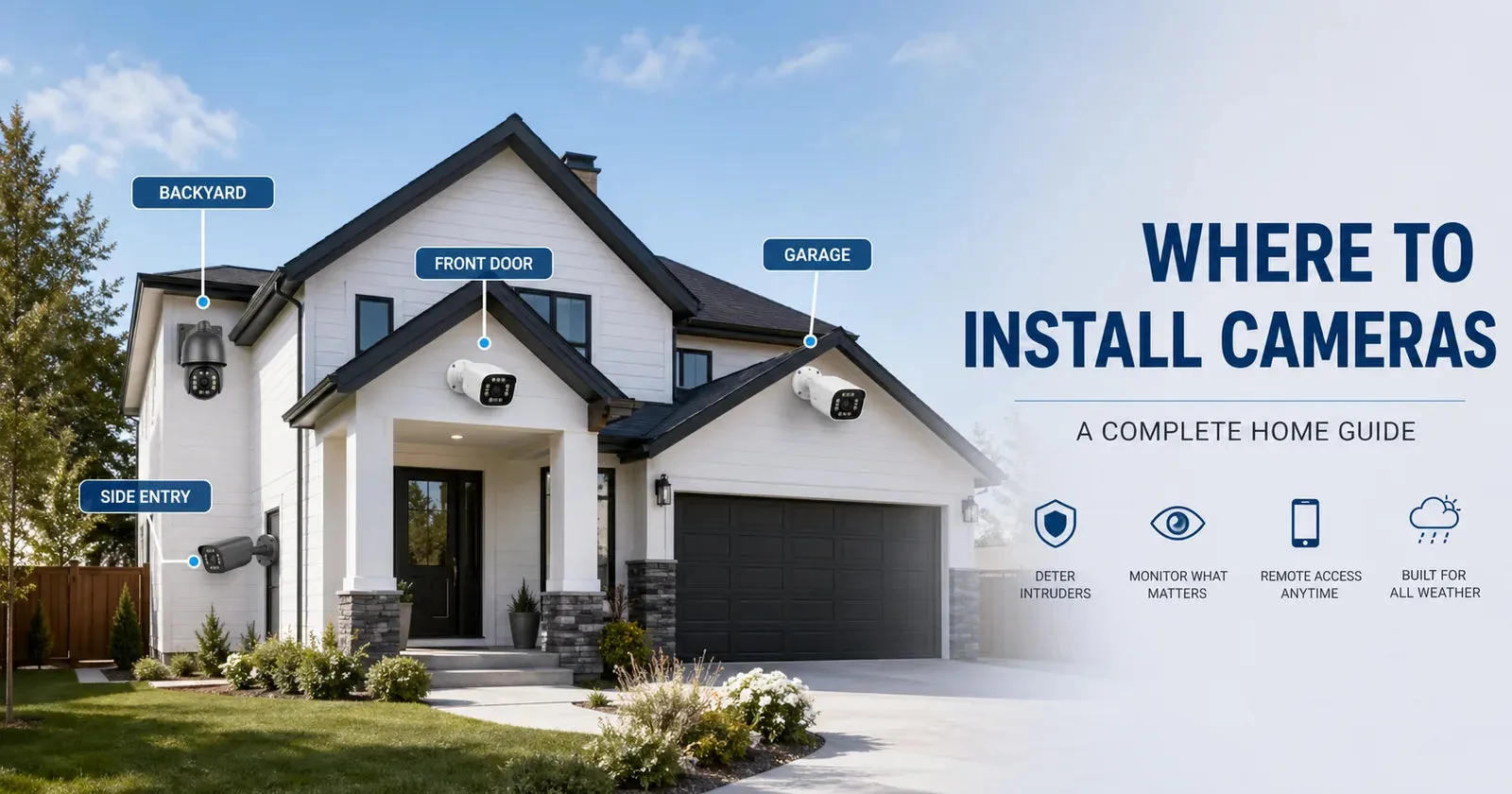
For homes, decide whether you want local recording, app alerts, package area coverage, garage visibility, driveway view, and perimeter context. A typical example surveillance configuration might include two outdoor turret cameras for front and rear doors, one driveway camera with a narrower field of view, one garage camera, one backyard camera, and one indoor common-area camera if privacy expectations allow. An 8-channel NVR gives room for expansion.
For small retail, a sample configuration may include entrance face capture, checkout counter coverage, aisle overview cameras, stock room coverage, rear door camera, and exterior approach view. The business may record continuously during open hours and use event alerts after closing. Cash handling views should be close enough for useful detail but should not capture sensitive payment data more than necessary.
For offices, prioritize entrance, reception, corridors, server room doors, supply rooms, and parking lot context. Avoid unnecessary recording in workstations where the purpose is unclear. Establish a written access policy so only authorized personnel can review footage.
For warehouses, use a layered approach: fixed cameras for dock doors and inventory areas, outdoor security cameras for yard and perimeter, and possible PTZ cameras for wide exterior spaces. Lighting and mounting height are critical. A camera at the far end of an aisle may not capture useful detail if the lens is too wide.
When comparing products, evaluate more than camera resolution. Look at WDR, low-light performance, lens range, weather rating, operating temperature, codec support, audio requirements, PoE power draw, local storage support, cybersecurity features, ONVIF support, warranty terms, and software usability. For the recorder, check channel count, incoming bandwidth, hard drive bays, maximum drive support, supported AI search, export options, and user management.
Common Applications
Homes use surveillance systems to monitor entrances, outdoor approaches, garages, deliveries, and detached buildings. The focus is usually awareness and evidence after incidents. Privacy should be considered for family members, guests, and neighboring properties.
Retail stores use cameras to review customer disputes, investigate loss, support staff safety, understand traffic flow, and check closing procedures. Cameras should be visible enough to support deterrence but placed carefully to avoid excessive intrusion.
Restaurants use CCTV camera coverage for entrances, point-of-sale areas, kitchens, storage rooms, dining area context, and back doors. Cameras can support safety and operations, but audio recording may be legally sensitive in many regions.
Warehouses and factories use systems for loading docks, equipment areas, restricted zones, inventory aisles, and worker safety investigations. They may require higher camera counts, stronger network planning, and longer retention.
Multi-site small businesses may use local NVRs at each branch with centralized viewing permissions. In these cases, standardized camera naming, time synchronization, and remote access policy become important.
Common Problems
Incomplete coverage is the most obvious problem. A site may have cameras at visible entrances but no view of side doors, parking areas, or delivery zones. A complete plan should include likely approach paths as well as obvious rooms.
Poor detail is another frequent issue. Buyers may assume a camera can digitally zoom after recording and reveal details that were never captured. Digital zoom enlarges pixels; it does not create lost information. If the target is small in the original image, the system needs a narrower lens, closer placement, higher resolution, or additional camera.
Storage underestimation causes video to overwrite too quickly. This is especially common after adding cameras to an existing NVR or increasing resolution without expanding hard drive capacity.
Network bottlenecks can cause dropped frames, delayed playback, or unstable remote viewing. PoE switch capacity, uplink bandwidth, recorder incoming bandwidth, and router performance should all be considered.
Privacy oversights can damage trust. A business should not install cameras without thinking about purpose, access, signage, employee expectations, and retention. A complete surveillance system needs governance as well as hardware.
FAQ
What makes a surveillance system complete?
A complete system includes planned camera coverage, reliable power and network connection, recording, storage, playback, remote access if needed, user permissions, privacy controls, and maintenance procedures.
How many cameras does a home need?
Many homes start with 4 to 8 cameras, but the right number depends on entrances, exterior paths, driveway layout, yard size, and whether indoor common areas should be covered.
How many cameras does a small business need?
Many small businesses use 8 to 16 cameras. A larger store, warehouse, or office may need more. Camera placement and lens choice are more important than a simple count.
Should I choose an NVR or cloud storage?
An NVR provides local recording and can be cost-effective for multi-camera systems. Cloud storage can simplify remote access but may involve subscription costs, bandwidth use, and privacy considerations. Some systems combine both.
What is a good retention period?
Common retention periods range from 7 to 30 days for many homes and small businesses. Higher-risk sites may require longer retention. Legal and privacy rules should also be considered.
Do I need AI surveillance?
AI functions are useful when you need better alerts and faster search. They are not required for every system. A well-placed standard camera can still be effective for simple recording.
Can I mix camera brands?
Sometimes. ONVIF can help with basic interoperability, but advanced functions may not work across brands. Always verify required features before purchasing.
What should be tested after installation?
Test daytime video, nighttime video, motion events, playback, export, remote access, user permissions, time synchronization, storage retention, and camera names. Testing should be done before relying on the system.
Related QuarkView Planning
After the overall layout is clear, refine the design with the best camera placement guide, the Business Surveillance Checklist for Small Companies, and the storage calculations in surveillance storage planning. Any shared or commercial site should also account for Security Camera Privacy Basics before cameras go live.
QuarkView buyers can then match the plan to PoE camera systems, NVR recorders, and PoE switches and power accessories so the camera layout, recorder capacity, and power budget work together.
Summary
A useful surveillance system starts on paper before it starts on a wall. Map the required views, choose cameras based on detail and environment, design stable PoE or network infrastructure, size the NVR and storage correctly, and manage privacy responsibly. A home security camera system may be simple. A business surveillance system may require stronger policies and more technical capacity. In both cases, planning creates better evidence, fewer blind spots, and a system that is easier to maintain.
Plan Your Security Camera System With QuarkView
Explore related QuarkView products or contact QuarkView for project and volume inquiry support.