
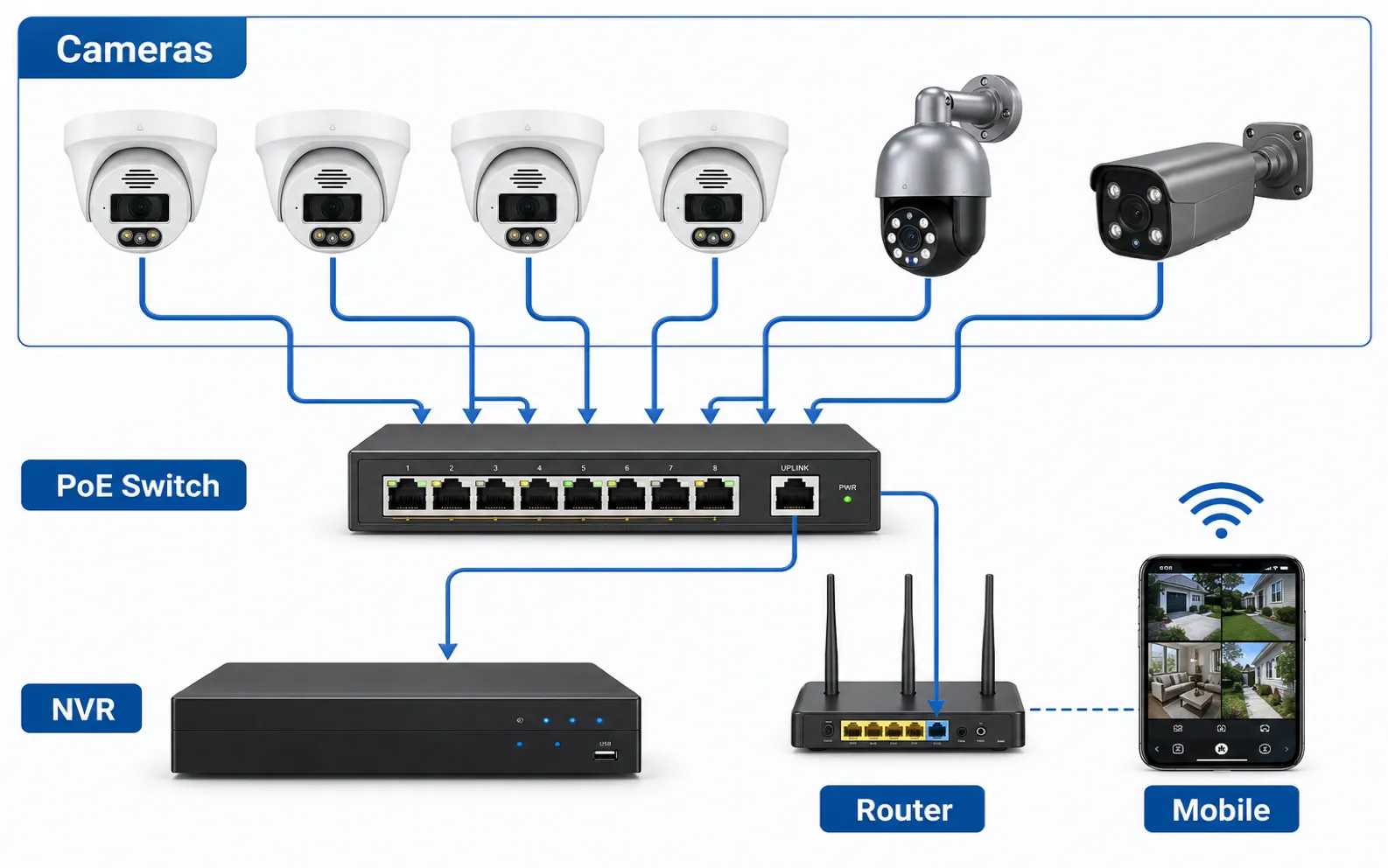
A PoE switch for security cameras supplies network connectivity and electrical power to IP camera devices through Ethernet cable. PoE means Power over Ethernet. In a PoE security camera system, one cable can carry data from the camera to the network and power from the switch to the camera. This simplifies installation compared with running separate power wires to every CCTV camera location.
PoE is widely used in wired security camera projects because it supports stable connections, centralized power management, cleaner cable routing, and easier backup power through a UPS. It is common in homes, offices, warehouses, retail stores, campuses, and outdoor security camera deployments. However, a PoE switch must be selected carefully. Port count, power budget, PoE standard, cable length, uplink capacity, switch management, environmental rating, and NVR integration all affect system reliability.
A good PoE design starts with a few plain questions: how many cameras, how much power per device, how far are the cable runs, and how much traffic will flow back to the recorder?
Plan this project
Use this article to define the requirement, then compare it with Shop QuarkView PoE switches and power or contact QuarkView for project-level guidance.
Related planning guides
PoE switch planning should be checked against cable distance, recorder capacity, maintenance access, and the final camera placement map. Start with CCTV cabling guide, then compare PoE troubleshooting steps and CCTV maintenance planning before finalizing the layout. For a deeper operational layer, keep camera placement guide in the planning path.
When the guide turns into a product shortlist, QuarkView buyers can compare PoE camera systems, NVR recorders, network camera accessories based on coverage area, cable path, recording needs, and installation environment.
How it works
A standard Ethernet switch moves data between network devices. A PoE switch does the same job but can also send DC power through the Ethernet cable to connected powered devices. In surveillance, the powered device is usually a PoE camera, but it may also be a wireless access point, intercom, access control reader, network speaker, or other low-voltage device.
The switch is called the power sourcing equipment, or PSE. The camera is called the powered device, or PD. Before delivering power, standards-based PoE equipment performs a detection and classification process. The switch checks whether the connected device is designed to receive PoE and how much power it may require. This protects non-PoE devices from receiving unexpected power.
The most common PoE standards are IEEE 802.3af, 802.3at, and 802.3bt. IEEE 802.3af is often called standard PoE or Type 1. It can provide up to 15.4 watts at the switch port, with less guaranteed at the device after cable loss. This is enough for many basic fixed IP camera models. IEEE 802.3at is often called PoE+ or Type 2. It can provide up to 30 watts at the port and is commonly used for cameras with stronger infrared illumination, motorized varifocal lenses, heaters, or more processing. IEEE 802.3bt includes higher-power Type 3 and Type 4 classes. These are used for higher-power devices such as PTZ cameras, multi-sensor cameras, strong white-light cameras, network speakers, and some specialized surveillance equipment.
The total power budget matters as much as the per-port standard. A switch may have eight PoE+ ports, but it may not be able to supply 30 watts to all ports at the same time. For example, an eight-port switch with a 120-watt PoE budget can support several moderate cameras, but not eight devices each drawing 30 watts continuously. Add the maximum power draw of every camera and leave reserve capacity.
Camera power use changes with conditions. A night vision camera may draw more power when IR LEDs turn on. An outdoor security camera with a heater may draw more power in cold weather. A two-way audio security camera may draw more when the speaker is active. A PTZ camera may draw more while moving, zooming, heating, and illuminating at night. Therefore, calculations should use the maximum power specification, not only typical daytime consumption.
PoE distance also needs attention. Standard Ethernet copper runs are commonly designed for up to 100 meters from switch to device under normal conditions. Long cable runs increase voltage drop and may reduce reliability, especially with high-power cameras or poor cable. For longer distances, installers may use fiber plus local PoE, PoE extenders, intermediate switches, or purpose-built long-reach systems. Each option should be evaluated for power, bandwidth, environment, and service access.
Switch placement affects system design. Some NVRs include built-in PoE ports. In that design, cameras connect directly to the NVR, and the NVR manages a private camera network. This can be simple for small systems. External PoE switches provide more flexibility for larger sites, distributed buildings, fiber uplinks, managed VLANs, and easier replacement. In some projects, cameras connect to multiple PoE switches that uplink to a central NVR or VMS server.
Managed and unmanaged switches serve different needs. An unmanaged PoE switch is simple and inexpensive. It can work well for small systems where all cameras are local and network design is basic. A managed PoE switch provides features such as VLANs, port status, PoE scheduling, power cycling, bandwidth monitoring, storm control, link aggregation, and remote diagnostics. For business surveillance systems, managed switches can reduce service time because technicians can identify port status and reboot a camera without visiting the site.
Uplink capacity should not be ignored. If many cameras send video through one uplink to an NVR, the uplink must support the combined bandwidth. Eight 4 MP cameras may be fine on a gigabit uplink if bitrates are controlled, but many high-resolution cameras, high frame rates, or multiple viewing clients can create congestion. Switch backplane capacity and uplink speed should be reviewed in larger designs.
Features to compare
PoE combines power and data over Ethernet, reducing separate power wiring for IP camera installations.
PSE and PD are the two sides of PoE. The switch supplies power, and the camera receives it.
IEEE 802.3af, 802.3at, and 802.3bt define different power levels. The camera requirement must match the switch capability.
Power budget is the total amount of PoE power the switch can deliver across all ports. It is often the limiting factor in real projects.
Cable quality affects power and data. Solid copper Cat5e or Cat6 cable is preferred for reliable PoE security camera system installations.
Managed switches provide monitoring and control. They can simplify troubleshooting, remote reboot, VLAN segmentation, and larger surveillance system designs.
Uplink bandwidth carries aggregated camera traffic to the NVR or network. A slow uplink can cause recording or live-view problems.
UPS backup can keep cameras and the NVR running during short power outages if the PoE switch and recorder are connected to the backup power system.
Match power, cables and network capacity
Start with the camera list. Count every PoE camera, including future expansion. Note each camera's maximum wattage and required PoE standard. Include PTZ cameras, dual lens security camera devices, network speakers, wireless bridges, and access control devices if they will share the switch.
Calculate total power. Add the maximum power consumption values, then leave headroom. Many installers prefer not to run a switch at its full stated PoE budget because real sites include startup surges, temperature effects, and future additions.
Choose the correct port count. An eight-camera project may need a 16-port switch if future expansion, spare ports, uplinks, or service devices are expected.
Check uplink ports. Gigabit uplinks are common, but larger projects may need multiple gigabit uplinks, 2.5G, 10G, fiber SFP, or link aggregation.
Decide between built-in NVR PoE and external switches. Built-in PoE is simple for compact systems. External switches are better for distributed cable routes, large buildings, managed networks, and professional troubleshooting.
Consider switch environment. A switch installed in a climate-controlled IT closet has different requirements from one installed in a warehouse, cabinet, pole box, or outdoor enclosure. Check operating temperature, ventilation, surge protection, and mounting.
Review security features. Managed switches can support VLAN separation, port isolation, access control lists, and monitoring. These features help keep the surveillance network separate from guest or office traffic.
Buy from a supportable ecosystem. If the NVR, cameras, and PoE switch come from different vendors, ensure the installer can support the entire chain.
Common Applications
Homes use small PoE switches to power driveway, garage, front door, and yard cameras from one central location.
Retail stores use PoE switches to connect checkout, entrance, aisle, and stockroom cameras to an NVR security system.
Warehouses use distributed PoE switches to reduce long cable runs across large buildings and connect groups of cameras near loading docks or storage aisles.
Office buildings use managed PoE switches with VLANs to separate security camera traffic from normal business data.
Outdoor sites use PoE switches in weatherproof or industrial enclosures for gates, perimeter cameras, parking areas, and remote buildings.
Schools and campuses use fiber uplinks between buildings and local PoE switches to power nearby cameras.
Common Problems
The switch has enough ports but not enough power budget. Cameras may work at first but reboot when IR lights, heaters, or PTZ motors activate.
Cable runs are too long or use poor cable. This can cause link drops, low power, packet loss, or camera restarts.
The uplink is overloaded. Live view may freeze or recordings may drop frames when many high-resolution cameras stream through one link.
An unmanaged switch gives no diagnostic information. The installer must physically inspect ports instead of checking status remotely.
PoE standards are mismatched. A high-power PTZ or multi-sensor camera may not work on a basic 802.3af switch.
Outdoor switch enclosures overheat. PoE switches generate heat, and sealed boxes in direct sun can exceed operating limits.
Power backup covers the NVR but not the PoE switch. In that case, the recorder stays on during an outage but cameras go offline.
FAQ
Do all IP cameras need a PoE switch?
No. Some IP cameras use Wi-Fi or separate power adapters. A PoE switch is used when the camera supports PoE and connects by Ethernet.
Can I plug a non-PoE device into a PoE switch?
With standards-based PoE switches, yes, the switch should detect whether the device needs PoE before supplying power. Avoid non-standard passive PoE unless you understand the voltage and device requirements.
How much PoE power does a security camera need?
Basic fixed cameras may need less than 15 watts. Cameras with IR, heaters, motors, speakers, or multiple sensors may need PoE+ or higher. Always check the datasheet.
Is Cat5e enough for PoE cameras?
Quality solid copper Cat5e is commonly used for PoE cameras and gigabit Ethernet. Cat6 may be selected for additional margin or site standards.
Can a PoE switch connect directly to an NVR?
Yes. Many systems connect cameras to an external PoE switch, then connect the switch uplink to the NVR or network.
What happens if the PoE budget is exceeded?
The switch may deny power to some devices, shut down lower-priority ports, reboot cameras, or become unstable depending on design.
Summary
A PoE switch for security cameras is not just an accessory. It is the power source, network aggregation point, and service point for much of the surveillance system. Match the switch to camera wattage, PoE standard, cable length, port count, uplink bandwidth, environment, and maintenance needs. Correct sizing prevents many of the random offline and reboot problems that show up later in IP camera and NVR security system projects.
How QuarkView Can Help
Explore related QuarkView products or contact QuarkView for project support, volume inquiries, and system planning help.
Reference Sources
- IEEE 802.3 Ethernet Working Group: https://www.ieee802.org/3/
- Ethernet Alliance Power over Ethernet overview: https://ethernetalliance.org/technology/ethernet/power-over-ethernet/
- Cisco Power over Ethernet technical information: https://www.cisco.com/c/en/us/solutions/enterprise-networks/what-is-power-over-ethernet.html
- Axis technical guide to network video, including network and PoE context: https://www.axis.com/dam/public/76/3a/3c/technical-guide-to-network-video-en-US-30065.pdf
- ONVIF profile documentation for IP camera interoperability: https://www.onvif.org/profiles/
- BICSI information and standards organization for ICT infrastructure: https://www.bicsi.org/
Related QuarkView resources
- Shop QuarkView PoE switches and power
- View QuarkView security solutions
- Contact QuarkView for layout, OEM, or volume questions
Ready to connect the selected switch? Follow the switch-to-NVR wiring and camera-addition steps. Before powering every branch, work through the mixed-camera power-budget example using your own model limits.