
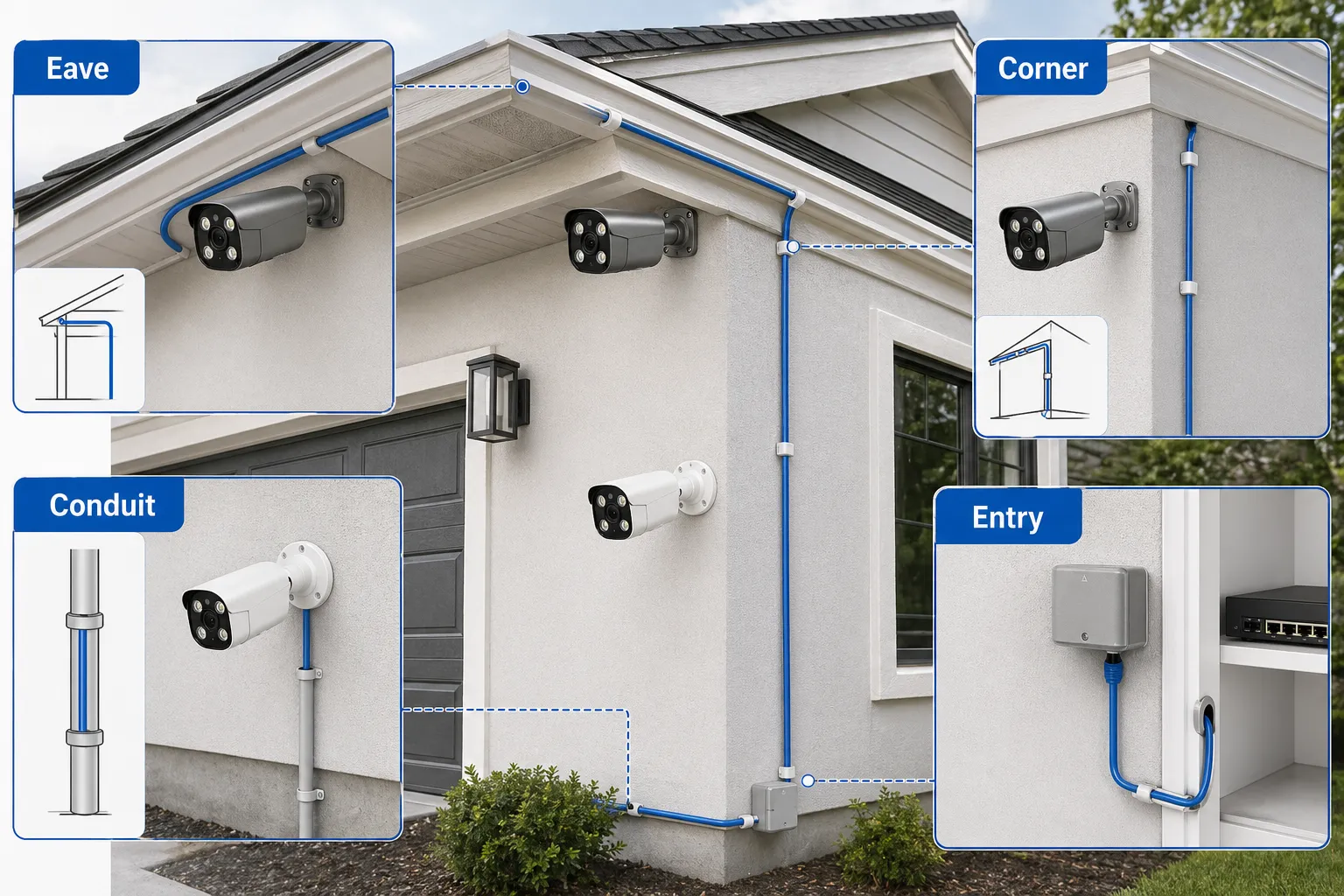
Cabling is the part of a surveillance system people notice least until something fails. Cameras, recorders, PoE switches, power supplies, monitors, routers, and remote viewing functions all depend on it. A high-quality security camera can produce poor results if the cable is too long, poorly terminated, exposed to water, underpowered, or installed near electrical interference. Many CCTV camera problems begin with cable choices made during installation.
Modern surveillance projects use several cable types. IP camera and PoE camera systems usually use twisted-pair Ethernet cable such as Cat5e or Cat6. Older or analog CCTV systems often use coaxial cable such as RG59, sometimes with separate power wires in a Siamese cable. Large sites may use fiber optic cable for long distances or building-to-building links. Some outdoor security camera locations require additional low-voltage power cable, conduit, surge protection, weatherproof junction boxes, and grounding.
The sections below cover Ethernet, coaxial, power, and fiber cabling, plus distance limits, installation practice, common mistakes, and questions to ask before buying a wired security camera or NVR security system.
Plan this project
Use this article to define the requirement, then compare it with Find QuarkView camera installation accessories or contact QuarkView for project-level guidance.
Related planning guides
Cabling decisions affect PoE budgets, placement flexibility, troubleshooting time, and the reliability of the finished camera system. Start with PoE switch basics, then compare common CCTV installation mistakes and CCTV troubleshooting before finalizing the layout. For a deeper operational layer, keep camera placement planning in the planning path.
When the guide turns into a product shortlist, QuarkView buyers can compare PoE switches and power, PoE camera systems, NVR recorders based on coverage area, cable path, recording needs, and installation environment.
How it works
Ethernet cable is the standard cabling choice for most modern IP camera systems. A PoE security camera system can send power and data through the same cable, which simplifies installation. The most common categories are Cat5e and Cat6. Quality solid copper Cat5e is generally suitable for gigabit Ethernet and many PoE camera installations. Cat6 provides additional performance margin and is often chosen for new commercial installations or where site standards require it.
The common design limit for standard copper Ethernet runs is 100 meters from network equipment to device. This includes the permanent cable and patch cords. In real projects, cable quality, connector quality, power demand, temperature, and installation conditions can affect reliability. Long runs close to the limit should be installed carefully and tested. If the distance is greater than 100 meters, installers may use an intermediate switch, PoE extender, fiber link with a remote PoE switch, or a specialized long-reach solution.
Ethernet cable quality matters. Solid copper conductors are preferred for PoE. Copper-clad aluminum cable may be cheaper but can have higher resistance, more voltage drop, and poorer long-term reliability. Outdoor cable should be rated for outdoor exposure or direct burial if it will be exposed to weather or soil. Indoor cable should match building requirements, such as plenum or riser rating where applicable. Local electrical and building codes should always be followed.
Termination is a major source of faults. RJ45 plugs and keystone jacks must be installed according to a consistent wiring standard, commonly T568A or T568B. Both ends of a cable should use the same standard for normal patch cables. Poor crimping, untwisted pairs, damaged conductors, excessive jacket removal, or water inside connectors can cause link drops, low speeds, packet loss, or PoE failures.
Coaxial cable is common in analog CCTV camera systems and HD-over-coax systems. RG59 is widely used for traditional CCTV distances, while RG6 may be used in some longer or specific applications. Coaxial video cable carries the camera signal to a DVR. Power is usually provided separately, either by a local adapter or by paired power conductors in Siamese cable. Coax can be effective, but it does not carry standard Ethernet data unless converters or special transmission systems are used.
Siamese cable combines coaxial video and power conductors in one jacket. It is convenient for analog CCTV because one pull can provide both video and power. The power wire gauge must be appropriate for the camera current and distance. Voltage drop can cause cameras to fail at night when IR illumination turns on. Shared power supplies should be sized correctly and protected with fuses or resettable outputs.
Fiber optic cable is used when distance, bandwidth, electrical isolation, or lightning risk make copper less suitable. Fiber does not carry PoE power by itself, so a remote power source or remote PoE switch is still needed near the cameras. Fiber is useful between buildings, across campuses, or from remote camera poles back to a control room. It can carry high bandwidth over long distances and avoids some ground potential and electromagnetic interference problems that affect copper.
Power cabling requires careful planning. Low-voltage DC cameras can be sensitive to voltage drop. A cable that delivers correct voltage at the power supply may deliver too little voltage at the camera after a long run. AC-powered cameras, PoE cameras, heaters, PTZ motors, white lights, and network speakers all have different requirements. The installer should calculate voltage drop, select proper wire gauge, and follow code requirements.
Physical routing affects long-term reliability. Camera cables should avoid sharp bends, crushing, staples through the jacket, strain at connectors, and direct exposure to moving doors or machinery. Outdoor cables should use drip loops so water does not run into junction boxes. Cable entries should be sealed. Conduit should be sized properly and installed to reduce water accumulation. Cables should be labeled at both ends.
Outdoor security camera systems need surge protection and grounding, especially on poles, building exteriors, gates, and long copper runs. Lightning and electrical surges can damage cameras, switches, NVRs, and routers. Surge protection must be installed according to the product instructions and local electrical practice. Improper grounding can create new risks, so qualified installers should handle complex outdoor and building-to-building work.
Features to compare
Ethernet cable supports IP camera data and, with PoE, camera power. It is the main cable type for modern wired security camera systems.
PoE reduces separate power wiring, but it depends on cable quality, distance, switch power budget, and camera power requirements.
Coaxial cable is common for analog and HD-over-coax CCTV systems. It usually requires separate power wiring.
Fiber optic cable is used for long distance, high bandwidth, electrical isolation, and building-to-building links.
Voltage drop affects power reliability. Cameras may reboot or fail at night if the voltage at the device drops too low.
Weatherproofing protects the cable system. Outdoor connectors should sit inside rated junction boxes or be sealed according to manufacturer guidance.
Testing and labeling reduce troubleshooting time. Cable certification or at least continuity and link testing should be part of handover.
Code compliance matters. Fire rating, cable support, conduit, grounding, and separation from electrical power should follow local regulations.
Match power, cables and network capacity
Choose the cable type based on camera technology. A new IP camera project generally uses Ethernet. An existing coaxial system may be upgraded with HD-over-coax cameras or converted gradually to IP using adapters or new cable runs.
Check cable distance before buying. If cameras are more than 100 meters from the switch or NVR PoE port, plan extenders, fiber, remote switches, or revised equipment locations.
Use solid copper cable for PoE camera installations. Choose cable with documented conductor material and category performance matched to the installation.
Match cable jacket to environment. Outdoor, direct burial, UV-resistant, plenum, riser, and industrial cables serve different purposes. A cable suitable for an office ceiling may not survive direct sunlight or underground moisture.
Plan junction boxes and service loops. A clean wired security camera installation should allow connector protection, future maintenance, and camera replacement without pulling a new cable.
Consider future expansion. Pulling extra cable or using larger conduit during the initial installation may be cheaper than returning later.
Coordinate with IT. IP camera systems are part of the network. Switch locations, VLANs, patch panels, rack space, UPS backup, and labeling should be planned with network administrators where applicable.
Ask for cable test results on professional projects. Documentation should show camera location, cable ID, length estimate, switch port, and test status.
Common Applications
Residential PoE security camera systems often use Cat5e or Cat6 cable from cameras to an NVR or PoE switch in a utility room.
Retail stores may use a mix of existing coaxial cable and new Ethernet cable during upgrades from analog CCTV to IP camera systems.
Warehouses use Ethernet for local camera groups and fiber uplinks between distant network closets.
Parking lots and gates may use outdoor-rated cable, conduit, surge protection, and remote PoE switches inside weatherproof enclosures.
Apartment buildings and campuses often use fiber between buildings and PoE switches near camera clusters.
Industrial sites may require shielded cable, conduit, careful routing away from high-voltage equipment, and ruggedized enclosures.
Common Problems
Intermittent camera offline events can be caused by poor RJ45 crimps, water in connectors, cable damage, or switch port issues.
PoE cameras reboot at night when IR or white light turns on. The cause may be voltage drop, insufficient switch power, or poor conductor quality.
Video freezes or drops frames because a cable negotiates at a lower speed or experiences packet loss.
Outdoor connectors corrode when left exposed or sealed incorrectly. Weatherproofing should protect the connector, not trap water inside.
Analog CCTV images show noise, rolling bars, or interference. Causes may include poor coax connectors, ground loops, power problems, or nearby electrical interference.
Cable runs exceed recommended distance. Extenders may help, but the better design may be a remote switch, fiber, or different equipment location.
Unlabeled cables make service slow. Technicians must trace every cable instead of going directly to the right port.
FAQ
What cable is best for IP security cameras?
Solid copper Cat5e or Cat6 Ethernet cable is commonly used. The correct jacket rating depends on the installation environment.
How far can an Ethernet cable run to a PoE camera?
The common standard design limit is 100 meters for copper Ethernet. Longer distances require other design methods.
Can I use old coaxial cable for new IP cameras?
Not directly as standard Ethernet. You may use converters in some projects, but new Ethernet cable or fiber is often better for long-term IP camera upgrades.
Why does my camera work in daytime but fail at night?
Night illumination increases power draw. Cable resistance, poor connectors, long runs, or insufficient PoE power can cause voltage problems.
Do outdoor camera cables need conduit?
It depends on exposure, local code, physical damage risk, and cable rating. Outdoor-rated cable, conduit, drip loops, and sealed junction boxes are often used together.
Is Cat6 always better than Cat5e for CCTV?
Cat6 can provide more performance margin, but quality installation matters more than category alone. Poorly installed Cat6 can perform worse than properly installed Cat5e.
Summary
Cabling is the physical foundation of a surveillance system. Ethernet supports modern IP camera and PoE camera installations, coaxial cable remains useful in analog and HD-over-coax systems, power cable must be sized for voltage drop, and fiber solves distance and electrical isolation challenges. Good cabling work comes down to cable quality, distance planning, weather protection, correct termination, surge protection, testing, and documentation. It reduces service calls and protects the value of every security camera connected to the system.
How QuarkView Can Help
Explore related QuarkView products or contact QuarkView for project support, volume inquiries, and system planning help.
Reference Sources
- IEEE 802.3 Ethernet Working Group: https://www.ieee802.org/3/
- Ethernet Alliance Power over Ethernet overview: https://ethernetalliance.org/technology/ethernet/power-over-ethernet/
- Axis technical guide to network video: https://www.axis.com/dam/public/76/3a/3c/technical-guide-to-network-video-en-US-30065.pdf
- BICSI information and standards organization for ICT cabling: https://www.bicsi.org/
- Telecommunications Industry Association standards organization: https://tiaonline.org/
- ONVIF profile documentation for IP camera interoperability: https://www.onvif.org/profiles/