
PTZ Camera Technology Explained for Security Surveillance

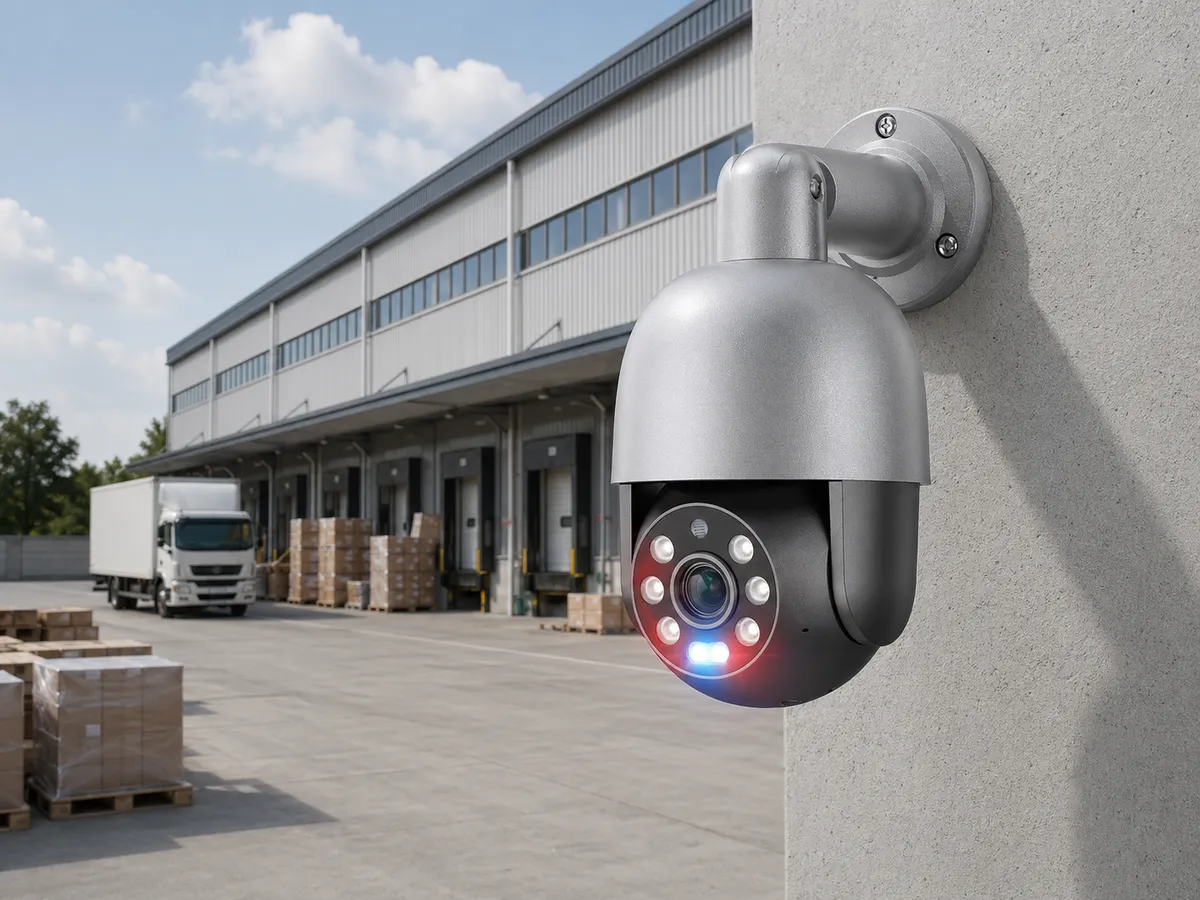
QuarkView PTZ security camera overlooking a yard for flexible surveillance coverage

Introduction

A PTZ camera is a security camera that can pan, tilt, and zoom. Pan means the camera can rotate horizontally. Tilt means it can move vertically. Zoom means it can narrow the field of view to capture more detail at a distance. PTZ camera technology is used in security surveillance when one camera needs to cover a large area, follow activity, or provide both wide-area awareness and close-up inspection.

PTZ cameras are common in parking lots, warehouses, campuses, construction sites, traffic areas, public spaces, industrial yards, and large commercial properties. They can be part of a PoE security camera system, an NVR security system, or a larger video management platform. Some PTZ models support automatic tracking, patrol patterns, presets, optical zoom, long-range infrared, white light, audio, and AI surveillance functions.

PTZ cameras are useful, but they are often misunderstood. A PTZ camera only records the direction it is looking at unless it is paired with fixed cameras or panoramic coverage. It can miss events outside its current view, which is why placement and operating rules matter as much as zoom range.

Main Technical Explanation

The PTZ mechanism uses motors and gears to move the camera module. Pan movement rotates the camera left and right, often across a wide range and sometimes continuously. Tilt movement points the camera up or down. Optical zoom changes the lens focal length so the camera can magnify distant objects without simply enlarging pixels digitally.

Optical zoom is the feature that usually justifies a PTZ camera. A fixed 8MP outdoor security camera may show a wide area but may not capture fine detail at long distance. A PTZ camera with optical zoom can narrow the view to a gate, vehicle, doorway, or person, increasing detail at the target. Digital zoom, by contrast, enlarges existing pixels and cannot create new detail.

PTZ cameras can be controlled manually through an NVR, joystick, browser, mobile app, or video management system. They can also use presets, which are saved positions such as "front gate," "loading dock," or "parking entrance." Patrols or tours move the camera through a sequence of presets. Some models support pattern recording, where the camera repeats a manually recorded movement path.

Modern PTZ cameras may include AI surveillance features. Auto-tracking can attempt to follow a person or vehicle after detection. Intrusion zones, line crossing, and object classification can trigger movement or alerts. However, analytics performance depends on scene design, mounting height, lighting, target size, and configuration. PTZ auto-tracking should be tested in the real environment before being treated as a guaranteed solution.

Power requirements can be higher than fixed cameras. PTZ motors, heaters, blowers, long-range IR LEDs, and optical zoom modules may require PoE+, high-power PoE, or separate power supplies. Buyers should check the exact power requirement and not assume every PoE port can run every PTZ camera.

Key Features or Concepts

Coverage and attention are not the same thing. A PTZ camera can look at many places, but not all at once. If it is zoomed into a gate, it may not record activity in the parking lot. This is why many professional systems pair PTZ cameras with fixed overview cameras. The fixed cameras maintain continuous coverage, while the PTZ provides detail when needed.

Optical zoom ratio changes what the camera can actually inspect. A 4x zoom PTZ is very different from a 25x or 36x zoom PTZ. Higher optical zoom can capture distant detail, but it also narrows the field of view and requires stable mounting. At long zoom levels, small vibration from wind or poles can affect image quality.

Preset accuracy matters for daily use. Good PTZ cameras can return to saved positions accurately. This affects patrols, alarm-triggered views, and operator workflows. Poor preset accuracy can make automated tours less useful.

Low-light design is harder on PTZ cameras than it looks on a data sheet. Outdoor PTZ cameras may need strong infrared, visible white light, large sensors, wide dynamic range, or full color night vision capability. Long-distance night viewing is difficult because light intensity decreases with distance and weather can scatter IR.

Operator workload is part of the design. A PTZ camera works well when someone can control it or when automation is carefully configured. In an unmanned small business surveillance system, fixed cameras may provide more reliable evidence unless PTZ presets and auto-tracking are well planned.

Buying Considerations

Start by deciding whether a PTZ is needed at all. If the goal is continuous evidence at several specific points, multiple fixed cameras may be better. If the goal is flexible inspection of a large area, a PTZ camera can make sense.

Mounting location can make or break a PTZ view. A PTZ should usually be mounted high enough to reduce tampering and provide a broad view, but not so high that useful detail is lost at common target areas. The mounting surface must be stable because vibration becomes more visible at high zoom.

Check optical zoom, not only megapixels. A 4MP PTZ camera with strong optical zoom may capture more distant detail than a fixed 8MP camera. The correct balance depends on distance, target size, lighting, and required evidence.

Confirm power and network requirements. A PTZ connected to a PoE security camera system may require PoE+ or higher. If the camera includes heater, wiper, or long-range illuminators, power demand may increase in cold weather or night conditions. The NVR or switch must support this.

Review compatibility. PTZ control should be tested with the NVR security system or software. Basic video may work through ONVIF, but advanced functions such as presets, tours, auto-tracking, wipers, defog, or AI events may require specific integration.

Consider privacy. A PTZ camera can look in many directions, which may create privacy concerns if it can view neighboring properties, private areas, or sensitive workspaces. Use privacy masks and operating policies where appropriate.

Common Applications

PTZ cameras are used in parking lots where operators need to zoom into vehicles, entrances, or incidents. They are also useful in warehouse yards, loading docks, distribution centers, construction sites, and large campuses.

In retail centers and business parks, PTZ cameras can provide flexible monitoring across open spaces. Security staff can use presets to move quickly between entrances, parking rows, and service areas.

In industrial sites, PTZ cameras may monitor gates, fence lines, storage yards, and equipment zones. They can support safety review as well as security, although cameras should not replace required safety systems.

For home security camera use, PTZ models can be useful on large properties, rural driveways, farms, or detached buildings. However, many homes are better served by several fixed PoE cameras because they provide continuous coverage without needing movement.

Common Problems

The most common problem is using one PTZ camera to replace too many fixed cameras. If an event happens while the PTZ is pointed elsewhere, the recording may miss it. A PTZ works better as a supplement to fixed coverage.

Another issue is unstable mounting. At high zoom, vibration from wind, poles, traffic, or lightweight brackets can make video shaky. Strong mounts and proper poles are important.

Auto-tracking can create disappointment if expectations are unrealistic. It may lose targets in crowds, darkness, rain, or when objects cross paths. It can also follow the wrong object if rules are not configured carefully.

Power problems can occur when a PTZ camera is connected to an underpowered PoE port. The camera may work during daytime but fail when heater or IR turns on. Always check maximum power requirements.

Privacy complaints can arise if a PTZ appears to look into neighboring windows or restricted areas. Masking and clear policies help reduce this risk.

FAQ

What does PTZ camera mean?

PTZ means pan, tilt, and zoom. The camera can move horizontally, move vertically, and zoom optically or digitally depending on model.

Is a PTZ camera better than a fixed camera?

It is better for flexible inspection and zooming, but fixed cameras are better for continuous coverage of specific views.

Can a PTZ camera auto-track people or vehicles?

Some models can. Performance depends on lighting, camera angle, target size, scene complexity, and configuration.

Can PTZ cameras use PoE?

Yes, many can, but they may require PoE+ or high-power PoE. Check the camera's maximum power draw and switch budget.

Do PTZ cameras work at night?

Many support IR or low-light technology, but long-distance night viewing depends on illumination, weather, lens quality, and sensor performance.

How QuarkView Can Help

A PTZ camera usually works best as part of a broader coverage plan, so compare this topic with bullet and dome camera comparison, outdoor installation guide, night vision camera planning, and IP camera buying guide before relying on movement and zoom where fixed views may still be required.

QuarkView shoppers can evaluate PTZ cameras, PoE camera systems, PoE switches and power, and NVR recorders when planning power, recording, and fixed-camera support around a PTZ deployment.

QuarkView note: QuarkView treats PTZ cameras as a supplement to fixed coverage: useful for active monitoring and large zones, but best paired with fixed cameras that keep recording key entrances and paths.

Summary

A PTZ camera is a flexible surveillance tool for large areas, long-distance inspection, and operator-controlled monitoring. Its strengths are movement, optical zoom, presets, patrols, and optional AI tracking. Its weakness is simple: it cannot view every direction at once. Use PTZ cameras where flexible inspection is needed, and pair them with fixed cameras when continuous evidence is required. Proper mounting, power planning, NVR compatibility, lighting, and privacy controls are essential.

Reference Sources

  • ONVIF Profiles for PTZ and IP video interoperability context.
  • ONVIF Profile S for video streaming and PTZ-related interoperability background.
  • Ethernet Alliance PoE resources for PoE power planning context.
  • NIST IR 8259A for connected device cybersecurity capabilities.
  • ITU-T H.265 for high-efficiency video coding background.

Next steps

Keep comparing before you choose equipment.

Use the links below to move from this guide into adjacent planning topics, product families, or a short quote request.

Related guides

Open Knowledge Base hub

Shop related systems

Need help choosing?

Share the site type, camera count, and recording target.

QuarkView can narrow PoE, NVR, PTZ, AI, WiFi, or solar options from a short project note.