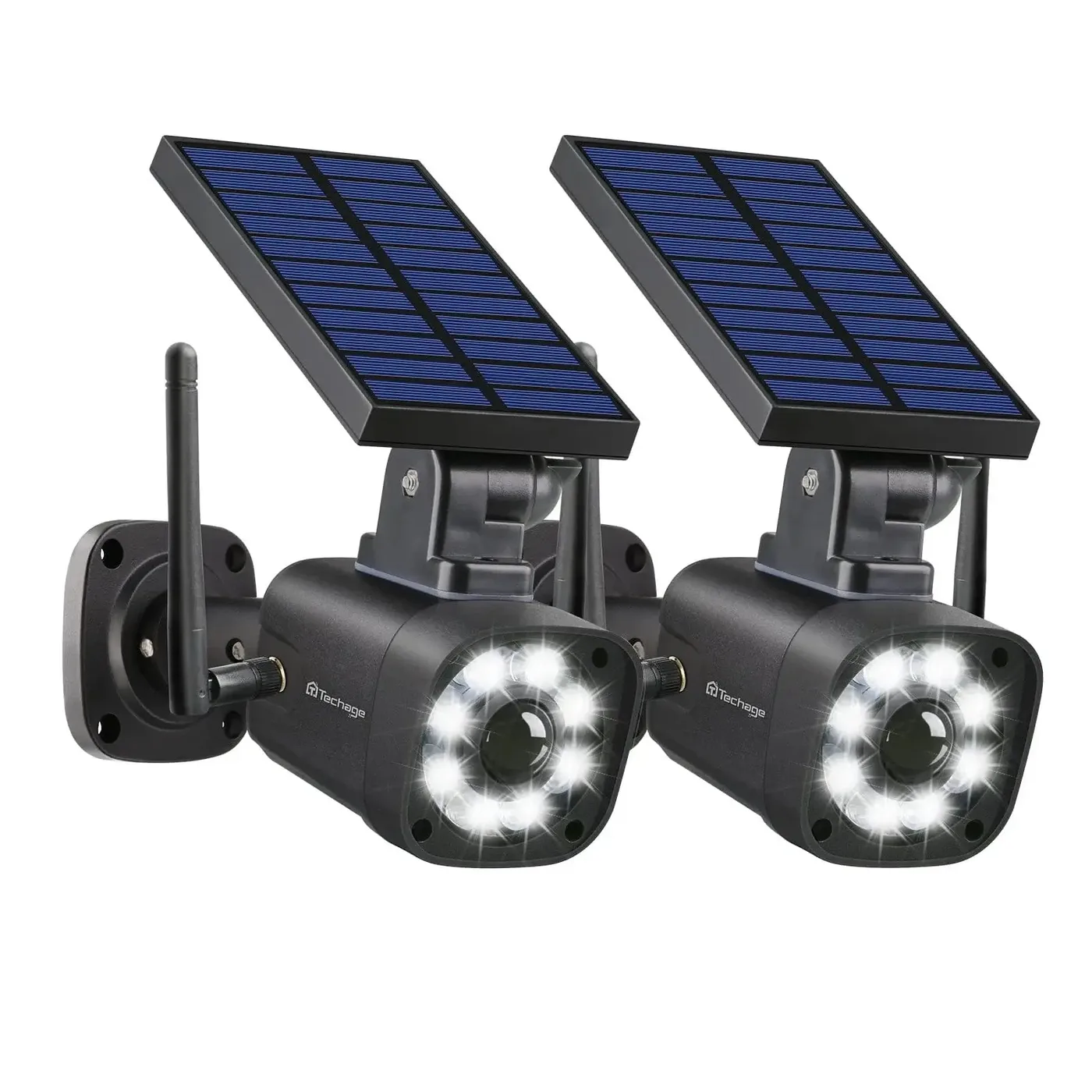
Dummy Camera Fake Security Camera with LED (Pack of 2PCS)

Dummy Camera Fake Security Camera with LED (Pack of 2PCS)

$59.99
Sale price  $59.99 Regular price  $99.99
Skip to product information
Dummy Camera Fake Security Camera with LED (Pack of 2PCS)
1/6

Dummy Camera Fake Security Camera with LED (Pack of 2PCS)

$59.99
Sale price  $59.99 Regular price  $99.99
Shipping calculated at checkout.

Before you order

Local shipping, warranty, and support details before you order.

View Trust Center

US warehouse shipping

Available SKUs ship from US warehouse inventory, with shipping method and cost confirmed before payment.

12-month warranty

Eligible QuarkView products include 12-month warranty support under normal use.

Local returns & replacement

Local return handling and local replacement support reduce post-purchase risk for eligible approved cases.

Response routing

Share site type, camera count, sample or volume plan, OEM needs, and timeline for an initial review during business hours.

Visual product details

Review product images, setup checks, and support path before you order.

Image-led product details help buyers confirm SKU fit, installation path, recording workflow, US warehouse fulfillment, 12-month warranty support, local returns, and local replacement handling before they request a quote or place an order.

Dummy Camera Fake Security Camera with LED (Pack of 2PCS)
Product view Dummy Camera Fake Security Camera with LED (Pack of 2PCS)

Use the product images together with the buying checks below to confirm model fit, mounting, connection path, and order scope before purchase.

Dummy Camera Fake Security Camera with LED (Pack of 2PCS)
System detail

Review the visible camera, recorder, accessory, or kit detail against the selected variant before ordering.

Dummy Camera Fake Security Camera with LED (Pack of 2PCS)
Installation context

Check mounting position, cable or wireless path, power access, and site conditions before final installation.

Dummy Camera Fake Security Camera with LED (Pack of 2PCS)
Detection and recording

Match the detection, recording, storage, and playback path to the way the site will be monitored.

Dummy Camera Fake Security Camera with LED (Pack of 2PCS)
Order confidence

Confirm warehouse route, package contents, warranty path, and replacement handling before committing to a project order.

Visual evidence Product media, feature images, and current SKU selection are shown before the quote path.
Buyer confidence Images are paired with compatibility, installation, warehouse, warranty, return, and replacement checks.
SEO / GEO value Image captions and structured product context help search engines and AI systems understand the page.
Image detail explainer

Use the pictures to answer the questions buyers ask before a higher-ticket order.

Strong security product pages do not rely on short text blocks. They use product images, installation visuals, recording workflow, night coverage, local delivery, and after-sales context to make the decision easier to trust.

Dummy Camera Fake Security Camera with LED (Pack of 2PCS)
SKU and package

Verify the product, variant, and visible hardware.

Compare the image with the selected SKU, package scope, camera body, recorder, accessory, cable, mount, or add-on before quote or checkout.

  • Selected variant and SKU
  • Package scope
  • Visible hardware
Dummy Camera Fake Security Camera with LED (Pack of 2PCS)
Installation path

Confirm where and how the product will be installed.

Use the product media to check mounting surface, camera angle, cable or wireless route, power access, weather exposure, and service access.

  • Mounting surface
  • Cable or signal path
  • Power access
Dummy Camera Fake Security Camera with LED (Pack of 2PCS)
Recording workflow

Match the product to storage, playback, and remote viewing.

Connect camera count, recorder channel count, storage days, app access, playback search, and expansion expectations before the order is placed.

  • NVR / app path
  • Storage days
  • Remote viewing
Dummy Camera Fake Security Camera with LED (Pack of 2PCS)
Coverage proof

Check detail, night view, detection, and outdoor fit.

Review field of view, night conditions, detection zones, weather exposure, and protected-area fit so the page feels like a buying guide, not a thin catalog listing.

  • Image detail
  • Night / detection
  • Outdoor fit
Check live view, alerts, and playback expectations.
Viewing workflow

Check live view, alerts, and playback expectations.

Use the selected SKU and product media to confirm app access, notification behavior, playback path, sharing needs, and account workflow before ordering.

  • Live view and alerts
  • Playback and storage
  • Account and sharing path
Keep delivery, warranty, returns, and replacement visible.
Local after-sales

Keep delivery, warranty, returns, and replacement visible.

US warehouse fulfillment, 12-month warranty support, local returns, and local replacement handling should be clear before higher-ticket buyers commit.

  • US warehouse fulfillment
  • 12-month warranty support
  • Local returns and replacement
Visual buying proof

More than short copy: feature, setup, system, and support visuals.

Mature product pages feel stronger because they explain the buying decision with images. This section gives every QuarkView product page a consistent visual layer for installation fit, recording workflow, coverage expectations, and local after-sales confidence.

Show how the product fits the site before purchase.
Installation planning

Show how the product fits the site before purchase.

Use mounting height, viewing angle, cable or wireless route, and coverage checks to reduce uncertainty before quote or order.

Mounting Coverage Site fit
Connect the camera decision to recording and playback.
Recording workflow

Connect the camera decision to recording and playback.

Clarify camera count, NVR path, storage days, app access, playback needs, and expansion expectations before the buyer commits.

NVR path Storage Playback
Make night, outdoor, and detection expectations visual.
Coverage proof

Make night, outdoor, and detection expectations visual.

Security buyers need to judge field of view, night conditions, weather exposure, detection zones, and protected-area fit.

Night view Detection Outdoor fit
Put warehouse, warranty, returns, and replacement near the product decision.
Local after-sales

Put warehouse, warranty, returns, and replacement near the product decision.

US warehouse fulfillment, 12-month warranty support, local returns, and local replacement handling reduce post-purchase risk.

US warehouse 12-month warranty Local replacement
Dummy Camera Fake Security Camera with LED (Pack of 2PCS)
Expanded visual detail

Use the product images to verify fit before a higher-ticket order.

This page turns product media into a visual buying checklist, so shoppers and trade buyers can judge model fit, setup path, recording workflow, local fulfillment, warranty, returns, and replacement handling without relying on a short description alone.

Selected SKU
TA-2-SL669B-US
Connection path
Review power, network, mounting, storage, app, and recorder requirements against the selected variant.
Monitoring workflow
Confirm recording, playback, notification, and remote-viewing expectations before the buyer commits.
Installation fit
Check mounting surface, viewing angle, exposure, power access, and site constraints before purchase.
Package and order scope
Use product images, selected variant, SKU, and quote notes to avoid package or compatibility confusion.
Local risk reduction
US warehouse fulfillment, 12-month warranty support, local returns, and local replacement handling are visible before the buyer commits.
Dummy Camera Fake Security Camera with LED (Pack of 2PCS)
Connection path

Check the physical product details against the selected variant.

Review power, network, mounting, storage, app, and recorder requirements against the selected variant.

Model fit Variant Setup path
Dummy Camera Fake Security Camera with LED (Pack of 2PCS)
Monitoring workflow

Connect the image detail to the monitoring workflow.

Confirm recording, playback, notification, and remote-viewing expectations before the buyer commits.

Recording Playback App / NVR
Dummy Camera Fake Security Camera with LED (Pack of 2PCS)
Installation fit

Confirm site fit before sample, quote, or volume order.

Check mounting surface, viewing angle, exposure, power access, and site constraints before purchase.

Mounting Coverage Site review
Image-backed details

Feature-by-feature visuals for a lower-risk buying decision.

Each image is paired with a practical buying check, so shoppers and trade buyers can judge product fit, installation path, recording workflow, local fulfillment, warranty, return, and replacement handling without relying on a short description alone.

Dummy Camera Fake Security Camera with LED (Pack of 2PCS)
Product view

Confirm the exact product and package scope.

Use the product images together with the buying checks below to confirm model fit, mounting, connection path, and order scope before purchase.

  • Check the selected variant, visible hardware, camera body, recorder, accessory, or kit scope.
  • Use the image to reduce model confusion before quote, sample order, or volume purchase.
  • Ask for project review if the site requires OEM, document, or compatibility confirmation.
Dummy Camera Fake Security Camera with LED (Pack of 2PCS)
System detail

Plan the installation route before purchase.

Review the visible camera, recorder, accessory, or kit detail against the selected variant before ordering.

  • Confirm mounting surface, cable or wireless path, power access, and network layout.
  • Match the camera location to entrance, driveway, storefront, warehouse, or parking coverage needs.
  • Share site type and camera count when requesting a project-fit quote.
Dummy Camera Fake Security Camera with LED (Pack of 2PCS)
Installation context

Match recording, playback, and app expectations.

Check mounting position, cable or wireless path, power access, and site conditions before final installation.

  • Review recorder channel count, storage days, playback path, app access, and expansion needs.
  • For PoE systems, align NVR ports, switch path, cable distance, and future camera count.
  • For WiFi or battery cameras, check signal strength, notification behavior, and storage path.
Dummy Camera Fake Security Camera with LED (Pack of 2PCS)
Detection and recording

Check detection, night coverage, and outdoor fit.

Match the detection, recording, storage, and playback path to the way the site will be monitored.

  • Review detection zones, night view expectations, weather exposure, and mounting height.
  • Confirm whether the product fits indoor, outdoor, storefront, warehouse, or perimeter use.
  • Request support if camera placement, lens angle, or recorder compatibility is uncertain.
Dummy Camera Fake Security Camera with LED (Pack of 2PCS)
Local fulfillment

Reduce risk with a visible delivery and after-sales path.

US warehouse fulfillment, 12-month warranty support, local returns, and local replacement handling are part of the purchase-confidence path.

  • Available SKUs can ship through US warehouse inventory for faster local delivery.
  • Local return handling and local replacement support are available for eligible approved cases.
  • Warranty, return, and replacement expectations should be clear before payment.
Dummy Camera Fake Security Camera with LED (Pack of 2PCS)
Quote readiness

Send a clearer inquiry with fewer follow-ups.

A useful quote request includes site type, camera count, delivery country, sample or volume plan, OEM needs, timeline, and any power, network, or compatibility constraints.

  • Include project location and expected quantity to improve quote quality.
  • Share existing recorder, camera, switch, or app requirements when compatibility matters.
  • Complex technical cases may need photos, video, or diagnostics before final resolution.
Buyer manual

Read this product like an installer, not a casual shopper.

Short product descriptions create doubt for security buyers. This manual turns the selected SKU into a practical review path for model fit, installation readiness, recording workflow, local delivery, warranty handling, and quote quality before the buyer commits.

Product view

Start with the exact model and variant.

Use the product images together with the buying checks below to confirm model fit, mounting, connection path, and order scope before purchase. Compare the visible product body, selected option, SKU, accessory scope, and package expectation before treating the page as quote-ready.

  • Check whether the buyer needs a single camera, recorder, accessory, kit, or repeat-install part.
  • Use product images to reduce model confusion before sample orders, installer quotes, and volume requests.
  • For OEM, documentation, or compatibility-sensitive work, include the exact selected variant in the inquiry.
Connection path

Map connection, power, and compatibility before ordering.

Review power, network, mounting, storage, app, and recorder requirements against the selected variant. This is especially important when a buyer is matching new QuarkView hardware with an existing recorder, camera, switch, router, app, cable path, or power supply.

  • Confirm PoE, WiFi, solar, battery, DC power, channel count, or accessory fit against the actual site.
  • Check cable distance, port count, power budget, wireless signal, mounting surface, and storage requirements.
  • If an existing system is involved, send model numbers, photos, and compatibility constraints before purchase.
Monitoring workflow

Review monitoring workflow, not only hardware.

Confirm recording, playback, notification, and remote-viewing expectations before the buyer commits. A stronger product decision explains how the buyer will view live video, receive alerts, search playback, manage users, and keep footage useful after installation.

  • For camera systems, align camera count, NVR channel count, HDD planning, playback, remote viewing, and expansion needs.
  • For WiFi, solar, and battery cameras, confirm app onboarding, notification behavior, storage path, and signal quality.
  • For accessories, confirm how the part supports power, mounting, cable routing, service, or future expansion.
Installation fit

Check installation readiness before payment.

Check mounting surface, viewing angle, exposure, power access, and site constraints before purchase. Security buyers often hesitate when the page does not explain mounting, exposure, cable route, signal quality, storage, and service access in plain operational language.

  • Confirm mounting height, viewing angle, weather exposure, night coverage, cable entry, and maintenance access.
  • For multi-camera projects, share a simple site layout or camera-count plan so the order can be reviewed.
  • When the installation environment is uncertain, use the quote path before buying rather than guessing from specs.
Local fulfillment

Keep delivery and after-sales risk visible.

Higher-ticket security buyers compare more than price. They look for warehouse route, delivery expectations, return address, replacement handling, warranty clarity, and a support path that feels stable after payment.

  • Available SKUs can ship through US warehouse inventory, with fallback fulfillment available when needed.
  • Eligible products include 12-month warranty support under normal use.
  • Local return handling and local replacement support are part of the purchase-confidence path for approved cases.
Quote readiness

Send a request that can be reviewed without repeated follow-up.

A useful quote or B2B request should include the site type, product handle, selected variant, quantity, delivery location, timeline, sample or volume plan, OEM needs, and any compatibility or documentation requirements.

  • Include camera count, recorder or storage needs, power path, network constraints, and mounting conditions.
  • For technical questions, photos, video, model labels, logs, or a short diagnostic note may be needed.
  • For trade buyers, note whether the request is a one-time sample, repeat install, wholesale batch, or OEM project.
Approval notes

Use the page to approve the order, not only to browse the SKU.

Before payment, match the product photos, variant name, quantity, power path, mounting plan, and expected site conditions against the real project. For replacement parts, confirm the old unit model and the exact part being replaced. For systems, confirm camera count, recorder channels, storage expectations, and whether future expansion should be reserved.

Quote packet

Share the details that change price, delivery, and support.

Better inquiries include destination country, requested delivery route, required quantity, sample or repeat-order plan, installation deadline, documentation needs, and any private-label or project-specific requirement. This helps QuarkView respond with a cleaner recommendation instead of sending a generic product list.

Risk checks

Resolve uncertainty before it becomes a return or service issue.

If the buyer is matching old equipment, mixing brands, installing in harsh weather, using long cable runs, planning battery or solar placement, or buying for a business site, the quote path should be used first. Photos, labels, screenshots, logs, or a short video can make technical review faster and more accurate.

Review sequence

For a security product page that starts from a compact description, use this order: identify the exact SKU, review the images, confirm power and connection, match the installation scene, check recording or accessory purpose, confirm local fulfillment and warranty route, then send a quote request only after the open questions are listed. This keeps buyers, installers, and trade customers aligned before the order becomes a return, replacement, or support case.

Dummy Camera Fake Security Camera with LED (Pack of 2PCS)
Product fit

Inspect the exact product view before you quote or buy.

Use the image set to confirm the model body, selected variant, mounting style, accessory needs, and the visible details that matter before purchase.

  • Confirm model, selected variant, and visible hardware before quote.
  • Match the installation path to the buyer's site conditions.
  • Review US warehouse fulfillment, 12-month warranty, local returns, and local replacement handling.
Dummy Camera Fake Security Camera with LED (Pack of 2PCS)
Installation path

Check the setup path against the real site.

Match power, network, mounting position, cable or wireless route, and storage expectations before installation so the order scope is clear.

  • Confirm model, selected variant, and visible hardware before quote.
  • Match the installation path to the buyer's site conditions.
  • Review US warehouse fulfillment, 12-month warranty, local returns, and local replacement handling.
Dummy Camera Fake Security Camera with LED (Pack of 2PCS)
Risk reduction

Confirm fulfillment and after-sales handling before committing.

Review warehouse route, delivery expectations, 12-month warranty support, local returns, and local replacement handling before moving from quote to order.

  • Confirm model, selected variant, and visible hardware before quote.
  • Match the installation path to the buyer's site conditions.
  • Review US warehouse fulfillment, 12-month warranty, local returns, and local replacement handling.

Product details

Buying details, compatibility, and support path.

Dummy Camera Fake Security Camera with LED (Pack of 2PCS) for security camera security projects, with package and compatibility checks before purchase.

Review package scope, compatibility, US warehouse shipping, 12-month warranty support, returns, replacement handling, and the order checks that matter for security camera systems.

SKU TA-2-SL669B-US
Availability Available to order
What's included Product-specific package contents listed below
Compatibility Product-specific compatibility listed below
Shipping from US warehouse shipping for available SKUs; checkout or quote confirms method and cost
Warranty path Warranty details listed below
Support / quote Sales, quote, and support requests receive an initial review during business hours; complex technical cases may need photos, video, or diagnostics before final resolution.
Installation difficulty Check the mounting location, power source, network connection, and recording needs before ordering.

Key features

  • 2PCS package options help match the order to the site size.
  • Visible dummy-camera housing adds a deterrent-style presence without recorder setup.
  • Dummy security camera positioning keeps the page useful for direct buyers, installers, and quote requests.

Buyer checks

Best fit

Security buyers who need a practical product with clear package, compatibility, delivery, warranty, and support expectations before ordering.

Compare before buying

Compare connection type, recording path, storage, mounting location, app or recorder compatibility, warehouse availability, and after-sales path before choosing the variant.

Quote-ready details

For a more accurate recommendation, share site type, camera count, selected variant, recorder or storage needs, delivery location, timeline, and any OEM or document requirements.

Description

Product positioning: Dummy Camera Fake Security Camera with LED (Pack of 2PCS) is positioned for buyers who need a practical dummy security camera with clear expectations for installation, compatibility, package contents, and support before ordering.

Key features

  • 2PCS package options help match the order to the site size.
  • Visible dummy-camera housing adds a deterrent-style presence without recorder setup.
  • Dummy security camera positioning keeps the page useful for direct buyers, installers, and quote requests.

Best for

  • Home, shop, office, entry, driveway, and small-business monitoring needs.
  • Buyers comparing camera resolution, detection, night view, and installation style.
  • Projects that need current availability and compatibility checked before ordering.

Setup notes

  • Test WiFi signal, app onboarding, and power access at the final mounting position.
  • Check storage method before relying on continuous or event-based recording.
  • Test camera angle, night view, and detection zones before final tightening.
  • Tune motion sensitivity and notification rules after the real scene is visible.

Before you order

  • Check exact package contents for 2PCS, accessories, power supply, and current warehouse availability.
  • Check storage, memory card, cloud, or recorder requirements before ordering.
  • Check app, router, cable length, mounting, and compatibility requirements for the installation site.
  • For project, installer, reseller, or OEM questions, use the compatibility help module before ordering.

Additional product detail images

QuarkView SL669, Solar Battery Powered, Fake Security Camera, Dummy Cameras, Motion-Activated Floodlights, Realistic Look, Easy to Install, IP66 Waterproof, Warning Sticker Included, Pack of 2(Black)

Color  Black
Solar Panel 2Watt,5V
Battery Volume 2600 mAh, 3.7V
Power 5 Watt LED
Luminous flux 800LM
Color temperature White (6500K)
Lighting mode 1 modes
Lighting time 20 seconds
Material Metal
Working temperature -20-100℃


fake security camera black

Why Do I Need A Fake Camera?

According to FBI's research, 60% of the burglaries are not planned so these burglars are usually not prepared and they will easily be scared away. They will stay away from the houses which have security systems or security devices.

Security systems are nice but they alarm AFTER the break-ins. CCTV systems are able to inform you before the burglaries but they are quite expensive and the installation could be complicated. If you need some devices to make you feel safe, QuarkView simulated cameras are definitely your best choice!

As a simulated security camera, it can not only frighten ill-intentioned burglars but with 8 high-brightness LED lights and a PIR motion detector, you can also use it as a lighting tool and install it in your backyard, front door, driveway, warehouse, porch, etc.

More Convenient, More Eco.

solar power


The high conversion efficiency solar panel and 2600mAh large capacity battery ensure that the simulated camera can charge and work normally in any weather and light. There is no longer a need for disposable batteries, or to remove the simulated camera to replace the battery.

During the day, the solar panel absorbs the energy in the sunlight and converts it into electrical energy for storage in the battery. At night, the photosensitive sensor installed on the solar panel will sense the change of external light, and the red LED light will automatically light up. When someone passes by, the PIR motion sensor will be triggered, and the 8 white LED lights installed on the front of the camera will light up and continue to illuminate for 20 seconds.

IMPORTANT: Please install the camera in a position that can be exposed to the sun for a long time to achieve the effect of continuously charging the battery.

KEEP AWAY FROM MY HOUSE!

scare the bad guys away

Please Be Aware That The Simulated Camera Doesn't Have Voice Alarm!

QuarkView simulated cameras are equipped with 8 LED floodlights and a PIR motion sensor. If the burglars are not scared by the little red LED light (because EVERYONE knows little red light equals to fake camera), when they enter the detection area, the shiny floodlights will automatically turn on and expose them in the brightness!

You can also use the simulated cameras simply as motion lights to light up your porch, your front door, your garden, your backyard, etc. 

Specifications
Product type: Dummy security camera.
Connection / use: security camera.
Camera / pack count: 2PCS.
Model reference: Dummy Camera Fake Security Camera with LED (Pack of 2PCS).
What's included
Selected dummy security camera configuration.
Storage media is included only when the selected variant says so.
Power supply, mounting hardware, cables, and accessories can vary by product batch.
Manuals, firmware guidance, certification documents, or setup files can be requested when needed.
Use the compatibility help module to review exact box contents before ordering.
Compatibility
Check camera, recorder, app, power, storage, and network compatibility before ordering.
Contact us with the current model, SKU, or project layout if you plan to mix devices.
For installer or volume orders, check configuration before scheduling installation.
Installation difficulty

Check the mounting location, power source, network connection, and recording needs before ordering.

US warehouse shipping

QuarkView supports US warehouse fulfillment for available SKUs, with shipping method, delivery timing, cost, and taxes shown at checkout or in a project quote. For multi-site, installer, or bulk orders, use the quote path before purchase so stock and timing can be confirmed.

Warranty, returns, and replacement
Availability, warehouse routing, included documents, and warranty handling can vary by product variant and order size.
Use the compatibility help module to review current availability, certification documents, manuals, and support path before ordering.
Do not schedule installation until package contents, storage option, and compatibility have been confirmed.
Before you order
  • Check the selected variant, camera count, and any required storage, cables, mounts, power accessories, or add-ons.
  • Match the connection type, recorder or app path, installation location, and network or power constraints.
  • For installer, bulk, OEM / ODM, or multi-site work, use the quote path so the project scope is reviewed before purchase.
Decision FAQ

Answers that reduce buying risk before checkout.

These answers mirror the product FAQ data used for search and AI discovery, so buyers can confirm fulfillment, warranty, returns, replacement, fit, quote requirements, and documentation needs without leaving the product page.

Does QuarkView support US warehouse fulfillment for Dummy Camera Fake Security Camera with LED (Pack of 2PCS)?

QuarkView supports US warehouse fulfillment for available SKUs. Shipping method, delivery timing, cost, taxes, and duties are confirmed at checkout or in the project quote path.

What warranty, return, and replacement support is available?

Eligible QuarkView products include 12-month warranty support under normal use. Local return handling and local replacement handling are available for eligible approved cases.

How do I know whether Dummy Camera Fake Security Camera with LED (Pack of 2PCS) fits my installation?

Match channel count, connection type, power, storage, mounting, and app or recorder requirements. Also check installation location, power or network constraints, recorder or app path, storage expectations, and selected variant before ordering.

What should I send for a project quote or B2B review?

Share site type, camera count, selected model or variant, recorder and storage needs, delivery location, sample or volume plan, OEM needs, timeline, and any power or network constraints.

Are product documents or certificates available for this SKU?

Product documents and available certificate information can be reviewed by exact SKU or project requirement through the quote path. Use the contact form when documentation is part of the purchasing decision.